
Field service and work order management
Run every job from one app your field team actually uses
Work orders, scheduling, inspections and job reports in one app, set up around how your team already works. Bring your existing data and be up and running this week.
- Secure by default
- Works on mobile
- Free to start
Platform
The office plans. The field team delivers.
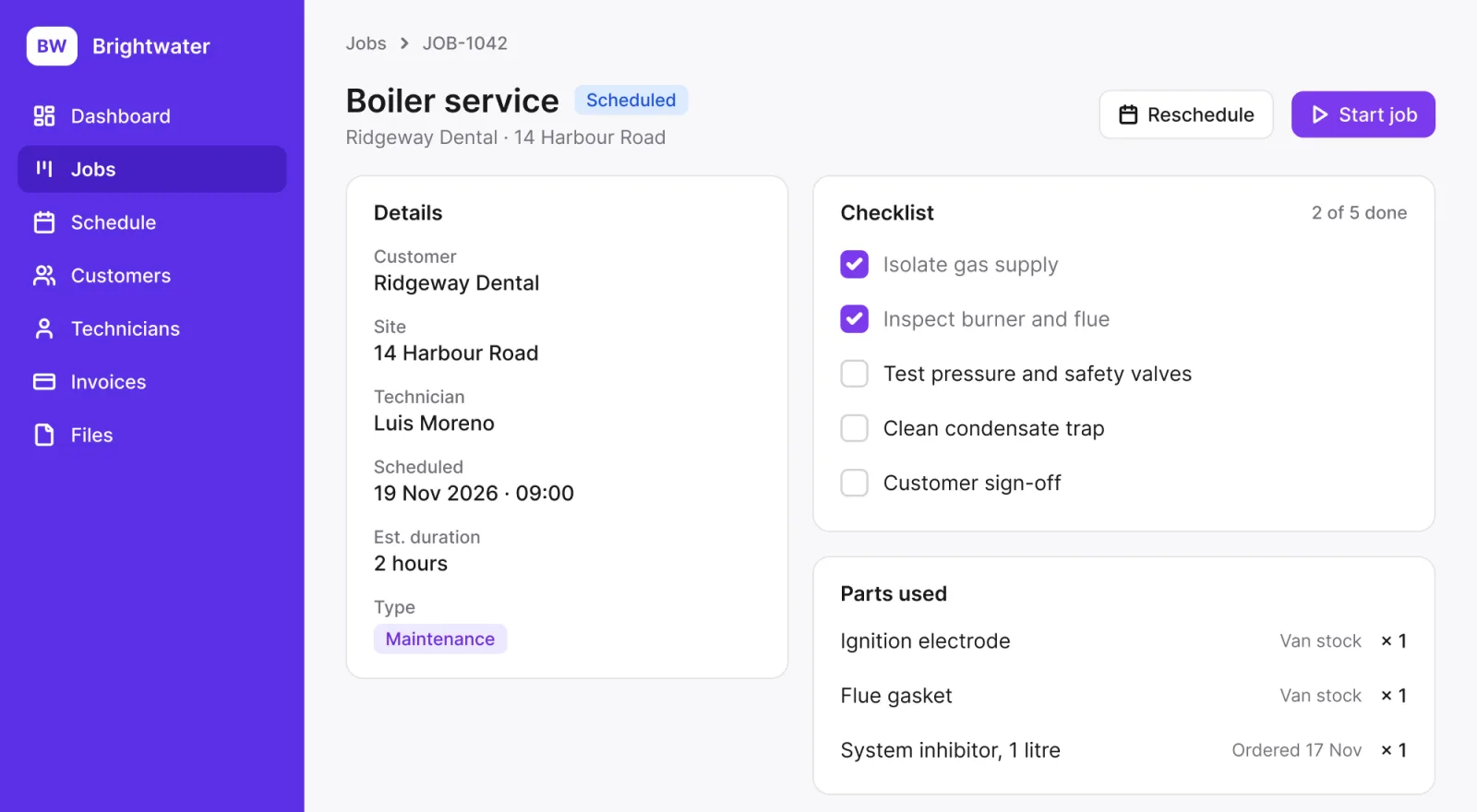
Every work order in one place
Work orders, sites, customers and schedules live in one app, so nobody chases updates across spreadsheets, group chats and paper job sheets.
A simple mobile app for technicians
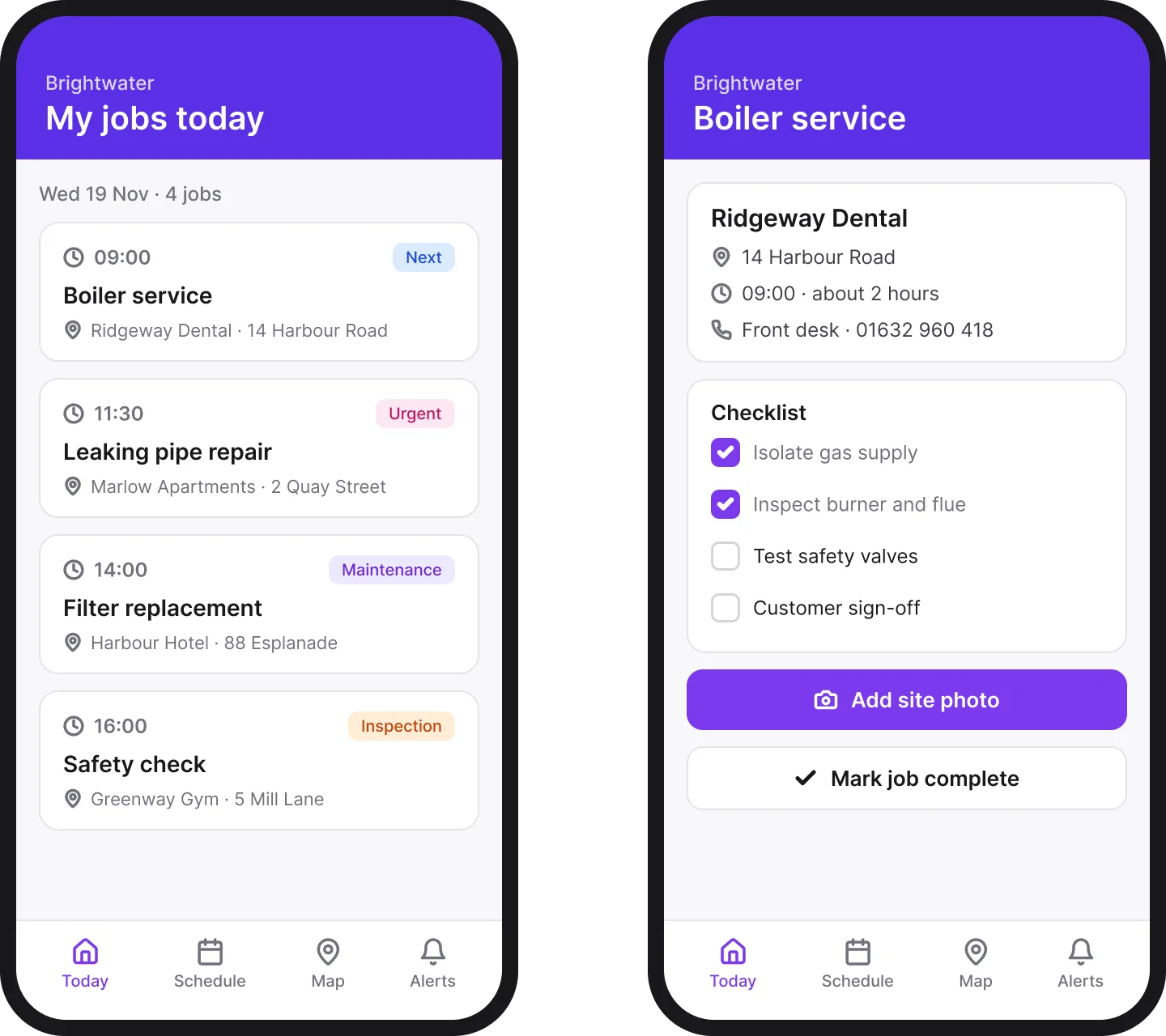
Technicians see only today’s jobs, site details and checklists on their phone, and log photos, time and materials before they leave the site.
Close the job the same day
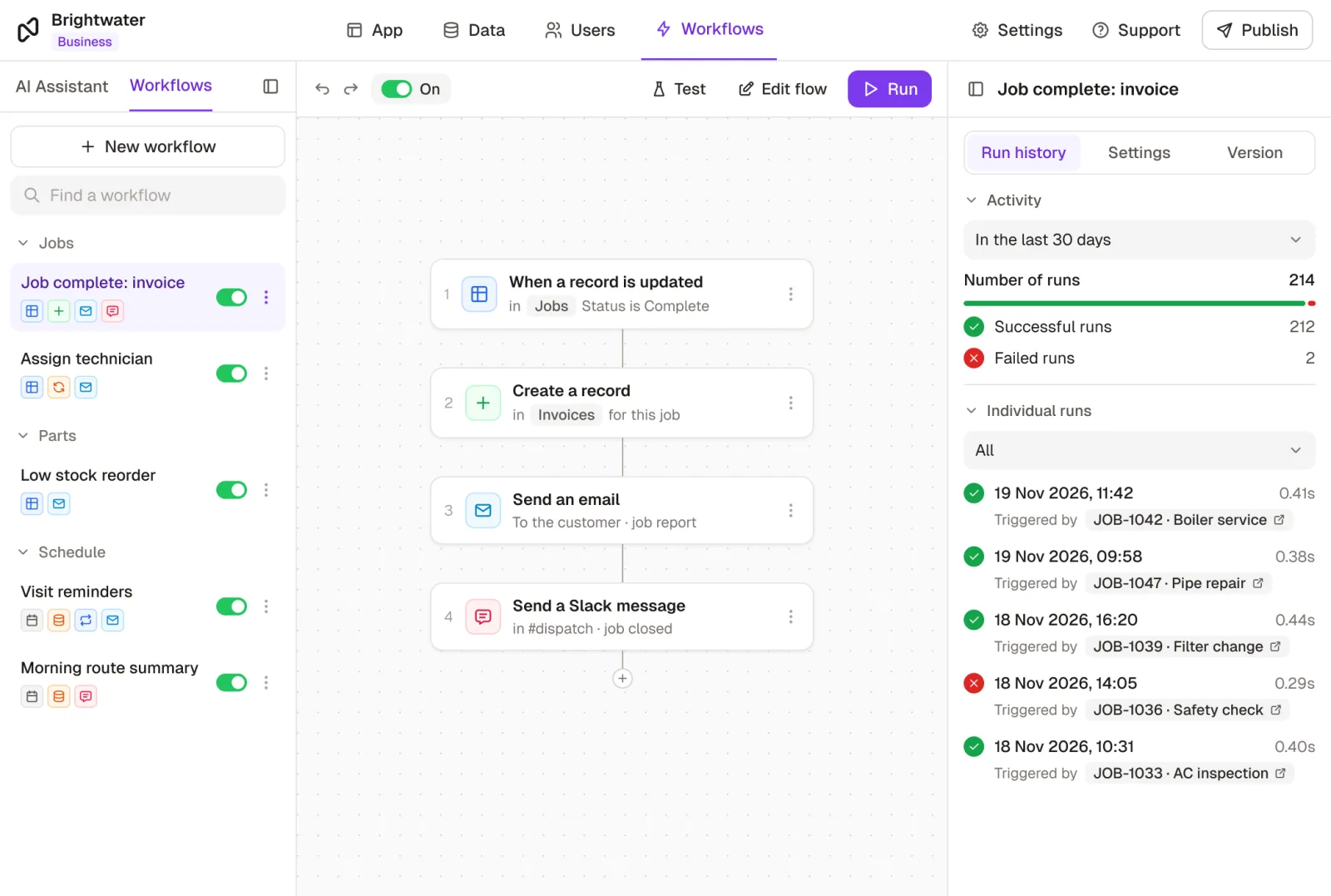
Job reports and photos land in the office as soon as the work is done, so you can invoice straight away.
Build it with AI. Keep control of your jobs and data.
Describe how your jobs run and Nola, the AI built into Noloco, builds the app. Unlike vibe-coded apps, logins, permissions and your data are handled by Noloco, not generated code.
Start from your own data
Import job sheets from Excel or Google Sheets, or connect your Airtable base. No migration project.
Change it yourself
Every table, view and workflow can be edited with point and click, so you're never stuck waiting on a developer.
Access is set, not generated
Who sees which jobs, sites and customers is configured in Noloco, not left to AI-written code.
Works with Claude
Connect Claude to Noloco through our MCP server and build or update your app by prompting.
Built for field work
Everything a field service team needs, in one app
Work order management
Create, assign and track every work order with status, priority, customer and site.
Scheduling and dispatch
See who is working where, and reassign jobs when plans change.
Field inspections and checklists
Forms technicians fill in on site, with photos and pass or fail results.
Recurring maintenance
Schedule repeat visits and service contracts automatically.
Role-based permissions
Technicians, office staff and managers each see only what they should.
Customer portal
Customers request jobs, track status and download reports without calling the office.
Customer love
Field teams that run their operations on Noloco


“We had a really good uptake in our digital style reports. There's no split reporting, and everyone knows exactly when their asset was last checked.”
 Jake FordCAT IV Vibration Analyst, PFE Limited
“Clean UI, great customization, and the best support team I have ever experienced with any software. We needed an internal & client tool and evaluated other tools, we loved the flexibility and UI design of Noloco the best. Bright future for this team and product!”
Integrations
Connect the tools you already use
 Airtable
 Postgres
 MySQL
 Google Sheets
 HubSpot
 Stripe
 Xano
 Supabase
 SmartSuite
 Zapier
 Make
 n8n
 Slack
 Google Drive
Frequently asked questions
What is a field service management app?
A field service management app helps businesses that send technicians to customer sites manage their work. It covers work orders, scheduling, inspections, job reports and customer communication in one place.
The office plans and assigns jobs, technicians see what they need on their phone, and managers can see where every job stands, without chasing updates across spreadsheets, group chats and paper job sheets. With Noloco, you build that app around your own process, on your own data.
What is work order management software?
Work order management software tracks each job from request to completion: who asked for it, where and when it happens, who is assigned, and what was done. A work order system replaces paper job sheets, email threads and spreadsheets with one place that the office and the people doing the work both keep up to date.
With Noloco you build your own work order app on your own data, with a mobile view for technicians, inspection checklists, recurring maintenance visits and a portal where customers request work and follow its status.
What features should a field service management app have?
The essentials are work orders with status, priority, customer and site; scheduling and dispatch, so you can see who is working where; and a mobile app technicians actually use on site.
Most teams also need inspection forms and checklists with photos, recurring maintenance visits, role-based permissions for technicians, office staff and managers, and a customer portal for job requests and status updates. With Noloco, all of these live in one app that you shape around your own process.
How is Noloco different from tools like Jobber or ServiceTitan?
Off-the-shelf field service tools come with a fixed workflow. With Noloco you build an app around how your team already works, on your own data, and change it whenever your process changes.
You decide which fields a work order has, what each inspection checklist asks, how a job moves from scheduled to complete, and who sees what. That suits field service teams whose work doesn't fit a standard template, or who have outgrown spreadsheets and don't want to rebuild their process around someone else's software.
Can my technicians use it on their phones?
Yes. Noloco apps work on mobile, and each technician only sees their own jobs and the details they need on site.
Technicians can install your app on their phone's home screen and get push notifications, for example when a job is assigned to them. From the job itself they log photos, time and materials, so the office has the update as soon as the work is done.
Can I use my existing spreadsheets or Airtable data?
Yes. Import from Excel or Google Sheets, or connect your Airtable base directly.
Bring in the job sheets, customer lists and site details you already keep, and build your field service app on top of them. There's no migration project: start with the data you use today, then add the tables, views and workflows your team needs as you go.
Can I track work orders in a spreadsheet?
You can, and many field service teams start that way. A work order tracking spreadsheet works while a few people update it from the office. It gets harder once technicians need to update jobs from site, two people edit the same row, or customers keep calling to ask where their job is.
With Noloco you don't start over: import the spreadsheet from Excel or Google Sheets, and it becomes a work order app with a mobile view for technicians, permissions for each role, and workflows that keep the office and your customers up to date.
Do I need technical skills to build it?
No. Describe what you need to Nola, the Noloco AI assistant, or start from the field service template, then adjust everything with point and click.
Tell Nola how your jobs, technicians and customers fit together and it sets up the tables, pages and workflows. After that, changes are yours to make: add a field to your work orders, change an inspection checklist, or set up a workflow that tells the office when a job is complete. No code, and no developer.
Can customers see the status of their jobs?
Yes. You can give customers a secure portal where they see only their own jobs, reports and invoices, and request new work.
Permissions are set in Noloco by role and by record, so a customer never sees another customer's sites or jobs. Customers check a job's status, download its report and send new requests themselves, which means fewer calls and emails to the office.
What types of field service businesses use Noloco?
HVAC, plumbing, electrical, fire safety, cleaning, inspection, maintenance, property services and installation companies, among others.
What they have in common is work that happens at customer sites: jobs to schedule, technicians to send out, checklists to complete and reports to deliver. Because each team builds its app around its own process, the same platform fits very different kinds of field work.
Get your field team off spreadsheets this week
Build a field service app that fits how you work. Free to start, no credit card required.
No credit card required