EnterprisePricing

.svg)
Noloco
vs

Airtable Interface Designer
The Best Airtable Interfaces Alternatives
When you outgrow Interface Designer — for client portals, field-level permissions, or external user access — here's what to use instead.
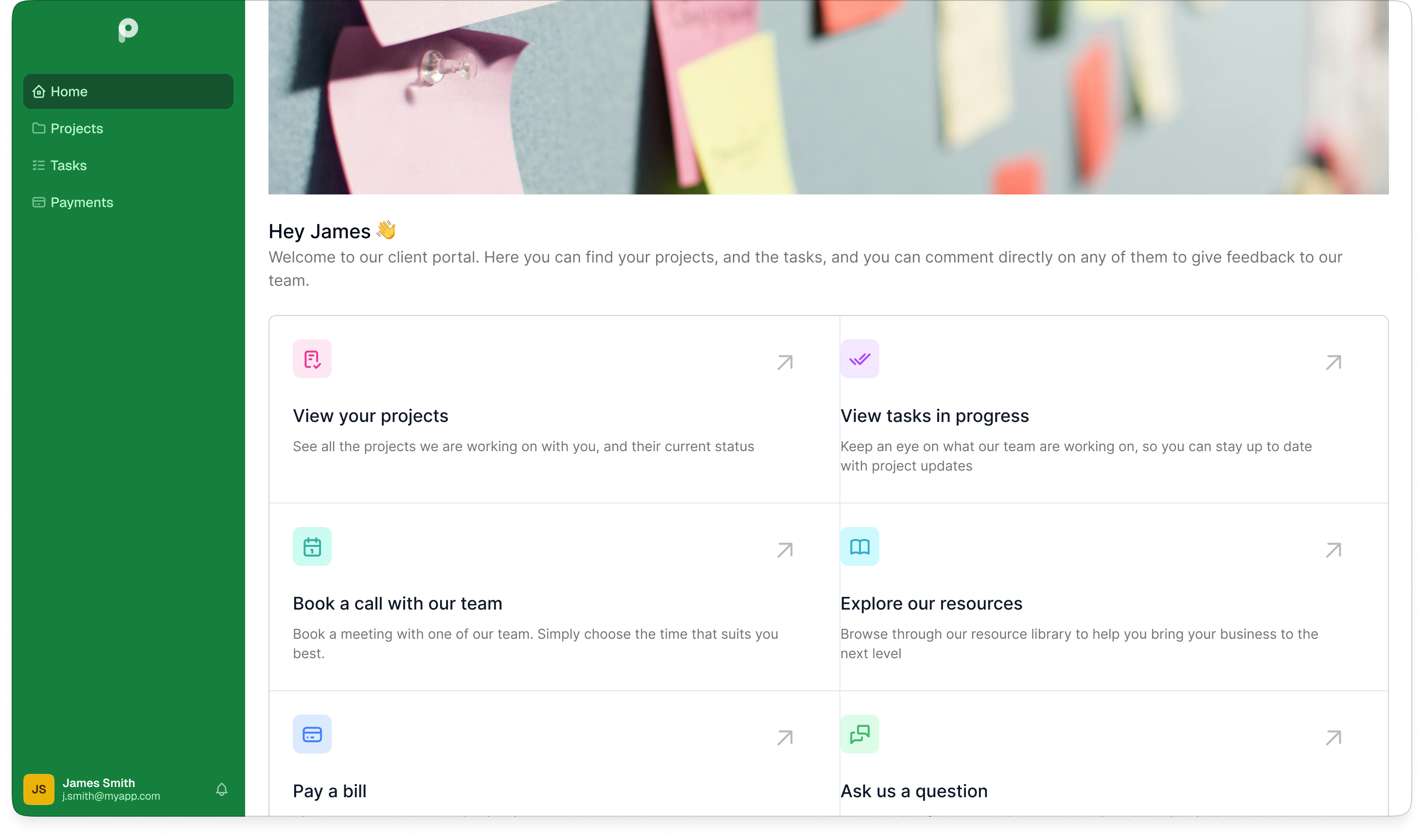
When Airtable Interface Designer is enough
— and when it's not

When AIrtable Interface Designer is the right tool

When you need an alternative
.svg)
Noloco

Your users are all internal team members with Airtable accounts
You need a cleaner view of shared data
You have a small, stable team where per-seat pricing stays manageable
Branding the experience beyond a logo isn't a priority
You don't need clients or external partners to log in

Softr
Clients or external partners need their own login to see only their data
The portal needs to look like your product — your domain, your branding
Your client count is growing and you can't afford per-seat cost to scale
You need reliable mobile access
Clients need to take actions — submit forms, approve deliverables, upload files
The four alternatives
Alternative #1: Noloco
Best for: Professional services firms — agencies, law firms, consultancies, accountancies, and similar — wanting a branded cleint portal or integral tool on top of Airtable.
Noloco connects to your Airtable base and turns it into a branded portal — client-facing or internal — without migrating your data. It offers full custom branding and domain, role-based permissions set once and applied everywhere, automatic record-level data isolation, multiple Airtable bases in one app, action buttons, multi-step forms, and a native mobile PWA.
Unlike Airtable Interfaces, external client seats are bundled into the plan rather than sold as a separate add-on — so your cost doesn't scale with every new client you add.
Unlike Airtable Interfaces, external client seats are bundled into the plan rather than sold as a separate add-on — so your cost doesn't scale with every new client you add.

Alternative #2: Glide
Best for: Teams building mobile-first tools from spreadsheets with a small, fixed user base.
Glide converts spreadsheet and database data into clean, mobile-feeling web apps quickly. It supports custom domains, public and private apps, and multi-step forms — and is particularly strong when mobile UX is the top priority.
How it compares to Noloco: Airtable connectivity requires a higher-tier Glide plan, per-user pricing means costs grow with every client you add. Noloco supports Airtable on all paid plans, bundles client seats in, and includes a native mobile PWA.
How it compares to Noloco: Airtable connectivity requires a higher-tier Glide plan, per-user pricing means costs grow with every client you add. Noloco supports Airtable on all paid plans, bundles client seats in, and includes a native mobile PWA.
Alternative #3: Softr
Best for: Teams wanting a template-rich visual builder that works across multiple data sources.
Softr builds portals and internal tools on top of Airtable, HubSpot, Notion, Google Sheets, and its own database. It supports custom domains, full branding, role-based access, and multi-step forms.
How it compares to Noloco: Noloco is purpose-built for professional services, with deeper Airtable-specific features, a native mobile PWA, and flat client-seat pricing that doesn't climb as your client base grows.
How it compares to Noloco: Noloco is purpose-built for professional services, with deeper Airtable-specific features, a native mobile PWA, and flat client-seat pricing that doesn't climb as your client base grows.

Alternative #4: Stacker
Best for: Mid-sized businesses with a technical operator who need CSS-level customisation and SQL database support.
Stacker builds client portals with two-way Airtable sync, unlimited external users, CSS customisation, AI-powered app generation, and a built-in SQL database.
How it compares to Noloco: Stacker sits at a significantly higher price point, positioning it as a mid-market tool. For professional services firms that don't need SQL or CSS-level customisation, Noloco delivers the core portal functionality — branded, permission-controlled, Airtable-connected — at a more accessible price.
How it compares to Noloco: Stacker sits at a significantly higher price point, positioning it as a mid-market tool. For professional services firms that don't need SQL or CSS-level customisation, Noloco delivers the core portal functionality — branded, permission-controlled, Airtable-connected — at a more accessible price.
Why teams choose Noloco
.svg)
Users only see what they should
Whether it's a client logging into their own portal or a team member accessing their department's data, every user sees exactly what their role allows— at your domain, with your branding. No one sees an Airtable spreadsheet.
.svg)
Covers both internal and client-facing in one tool
One tool for your team and your clients. Build an internal operations portal for your team and a branded client portal for your customers — both powered by the same Airtable base, with different roles controlling what each side sees.
.svg)
The bill doesn't grow with your headcount
Client seats are bundled into the plan. Whether you're adding new clients or new team members, your cost stays predictable.
.svg)
Permissions work at scale
Define roles once —Client, Manager, Admin — and every new user gets the right access automatically. No reconfiguring filters for every new user or new Interface page.
.svg)
Mobile experience
Your portal works on any device. Noloco apps install as a native PWA on any phone or tablet — so field teams, clients, and managers all get a consistent experience whether they're at a desk or on the go.
.svg)
No migration
Your Airtable base stays exactly as it is. No migration, no rebuilding your workflows. Noloco connects to your existing base and adds the portal layer on top — your team keeps working in Airtable the same way they always have.


Feature comparison
There’s a lot to love about Noloco and Airtable Interfaces.
To really grasp the differences between them, let’s compare their features side by side.
To really grasp the differences between them, let’s compare their features side by side.
FEATURE
Noloco
Airtable Interface Designer
Custom domain

Full custom domain

Not available
Branding
Full (logo, colors, fonts, layout)
Logo only (on higher plans)
External user access
Affordable, included in plans
External seat pricing scales poorly
Permissions
Row-level + field-level + role-based
View-level only
Mobile app
Native, installable PWA
Limited mobile support
Workflows
Built into app interface
Backend only, not part of the interface
Charts & dashboards
Native, built-in
Extensions add-on
Pricing model
Flat subscription (team + clients)
Per-seat + Portals add-on
Don't take our word for it
Trusted by 1,000+ teams and counting...




How to get started in four simple steps
.png)
Up and running in minutes
Start your 14-day free trial, no credit card required. Connect your Airtable base and Noloco generates your app pages automatically.
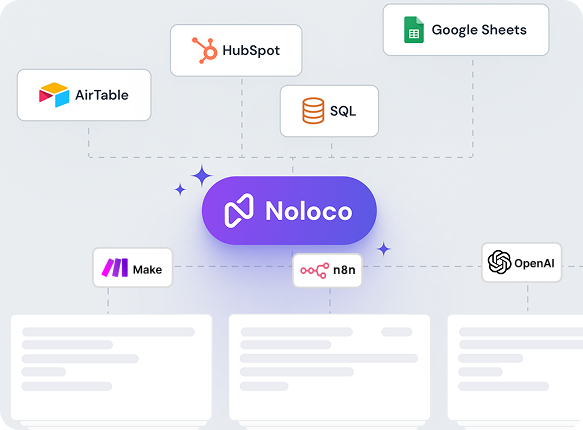
No migration needed
Noloco connects to your existing Airtable bases with live two-way sync. Your tables, linked records, and formulas stay exactly as they are.
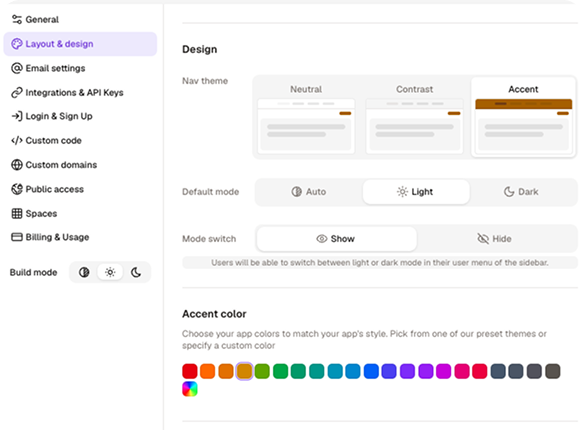
Customize your app
Add your logo, set your colours, configure what each user can see and do, all without writing a single line of code.
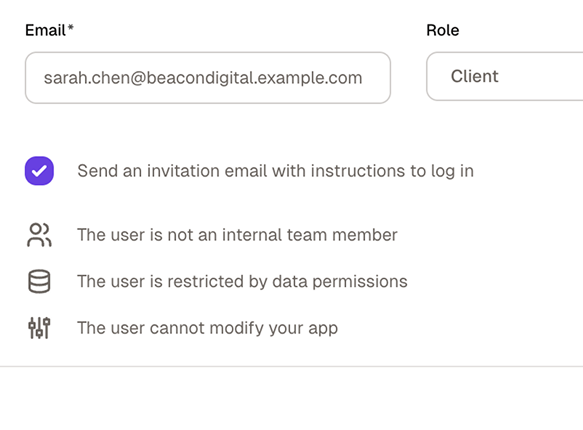
Invite your team and clients
Publish your app, assign roles, and send invitations. Everyone sees exactly what they need — and nothing they don't.
No credit card required
Still have questions?
Here are the ones we hear most.
What are the best alternatives to Airtable Interface Designer?
+
-
The most commonly used alternatives to Airtable Interface Designer are Noloco, Softr, Glide, and Stacker. Each connects to Airtable as a data source and adds features that Interface Designer doesn't offer natively: custom domains, branded experiences, external user logins, and granular permissions.
The right choice depends on your use case — Noloco is most commonly chosen by professional service businesses and agencies for its combination of client portal features, record-level permissions, and flat-rate pricing.
Can I keep using Airtable as my database when I switch to Noloco?
+
-
Yes! This is actually the most common setup.
You don’t switch away from Airtable at all. Noloco connects to your existing Airtable bases via live, two-way sync. When someone updates a record in Noloco, it updates in Airtable instantly. When you update data directly in Airtable, it’s reflected in the Noloco app.
The only thing that changes is the interface your team and clients use. Instead of Airtable’s Interface Designer, they use your Noloco app — with your branding, your permissions, and your custom layout.
Can Noloco replace Airtable entirely?
+
-
It depends on how you use Airtable. Noloco includes its own built-in database (Noloco Tables) with relational data support, so teams that primarily use Airtable as a backend database can fully consolidate into Noloco.
Many teams prefer using both together: Airtable as the backend and Noloco as the front-end experience for clients, partners, or internal teams.
Why can’t I just use Airtable Interfaces for my clients?
+
-
You technically can, but with significant limitations: there’s no custom domain, minimal branding options, and giving external clients access requires the Portals add-on at$120+/month. Even then, you can’t control what each individual client sees at the row level.
Noloco is built for exactly this use case. Clients get a branded portal on your domain, they log in securely, they see only their records, and you don’t pay per guest. It’s the difference between showing a client your spreadsheet and giving them a professional client portal.
Does Airtable Interface Designer support external client access?
+
-
Not natively.
Interface Designer is built for Airtable collaborators — people who have Airtable accounts in your workspace. To give external clients access (people without Airtable accounts), you need the Airtable Portals add-on, which comes with additional costs. Portals allow external users to access Interfaces through a separate guest login.
Alternatively, third-party portal builders like Noloco, Softr, and Stacker provide external access without requiring the Portals add-on.
Which Airtable Interface alternative is best for professional service businesses?
+
-
For professional service businesses managing multiple clients who each need isolated access to their own project data, Noloco is the most commonly chosen alternative. Its record-level permission system automatically shows each client only their own records, its flat-rate pricing means adding clients doesn't increase your per-user cost, and its custom domain and branding options let the portal represent your agency's brand rather than a third-party tool.
How long does it take to connect Airtable to Noloco and build a first app?
+
-
Most teams connect their Airtable base and have a working app in under an hour. Noloco reads your Airtable schema and auto-generates pages for each table, so you’re not starting from a blank canvas. You then customize layouts, set permissions, and apply your branding.
For a basic client portal (login, record list, detail page) plan for 1-2 hours of setup. More complex apps with custom workflows take longer, but Noloco’s template library covers the common starting points.
Can I try Noloco for free?
+
-
Yes. Noloco offers a 14-day free trial, which includes full access to the features on your selected plan. This allows your team to fully evaluate workflows, permissions, automations, and integrations. No credit card is required to get started.
Do I need to pay for both Airtable and Noloco?
+
-
If you keep Airtable as your database, yes — you’d pay for both. For most teams, the combined cost is still lower than Airtable alone once you factor in the Portals add-on for external access, per-editor seat costs, and plan upgrades triggered by record limits.
Alternatively, Noloco includes its own built-in database (Noloco Tables). Teams that don’t need Airtable’s native grid interface often migrate their data to Noloco Tables and drop the Airtable subscription entirely.
What can Noloco do that Airtable Interface Designer can’t?
+
-
— Custom domain and full white-label branding: your app looks like your product, not Airtable’s
— Row-level and field-level permissions: each user sees only what they’re allowed to see
—External user access included: no Portals add-on required
—Native mobile app (PWA): installable on iOS and Android with a real mobile experience
— Multi-step workflows and action buttons: automations triggered from within the app, not just in the base
—Unlimited interfaces on all plans: not dependent on your Airtable plan tier
— Charts and dashboards: built natively into your app layout
— Multi-source data: connect Airtable, GoogleSheets, PostgreSQL, and more in the same app
Is Noloco better than Airtable Interfaces for mobile?
+
-
Significantly. Airtable Interface Designer is primarily designed for desktop use — layouts don’t translate well to smaller screens and there’s no PWA or native mobile app support.
Noloco generates a fully responsive app that works on any device and can be installed as a PWA on iOS and Android. For field teams, contractors, or clients who primarily access tools from their phone, this is often the deciding factor.
Why do teams switch from Airtable Interface Designer to Noloco?
+
-
The most common triggers:
— They need to give clients or partners access and don’t want to pay the Portals add-on
— They want a branded app with their own domain and logo
— They’ve hit the interface limit on their Airtable plan
— They need row-level permissions, not just view-level
— They want a realmobile experience for their team or clients
— They want workflows and automations that are part of the app interface, not hidden in the Airtable base
Your Airtable base.
Your clients.
Your brand.
Connect your Airtable, build your first portal, and invite your team and clients — under just a couple minutes.