EnterprisePricing

.svg)
Noloco
vs

Airtable Interface Designer
Airtable Scalability Challenges for Growing Service Businesses
Record caps, per-seat billing, automation limits, permission complexity.
Here's a precise breakdown of where Airtable creates friction as you grow — and what growing service businesses do about it.
Here's a precise breakdown of where Airtable creates friction as you grow — and what growing service businesses do about it.
.png)
The six scalability challenges

Challenge 1: Record limits per base
The limits: Free: 1,000 records. Team: 50,000. Business: 125,000. Enterprise Scale: 500,000+. Limits are cumulative across all tables in a base — two tables with 25,000 records each have hit the Team plan limit.
Where it bites: Service businesses accumulate records across multiple types simultaneously — clients, projects, tasks, invoices, contacts. A 50-client agency with multi-year history can approach the Team limit within 18–24 months without noticing.
When you hit it: Airtable blocks new records. Your data is safe, but the base stops accepting input until you archive records, split the base, or upgrade. The upgrade from Team to Business is a 125% per-seat price increase.
Common responses: Archive historical records into a separate base; split the base by function; upgrade to Business; or connect multiple bases through Noloco so your team and clients see one unified app even when the data is split.
Where it bites: Service businesses accumulate records across multiple types simultaneously — clients, projects, tasks, invoices, contacts. A 50-client agency with multi-year history can approach the Team limit within 18–24 months without noticing.
When you hit it: Airtable blocks new records. Your data is safe, but the base stops accepting input until you archive records, split the base, or upgrade. The upgrade from Team to Business is a 125% per-seat price increase.
Common responses: Archive historical records into a separate base; split the base by function; upgrade to Business; or connect multiple bases through Noloco so your team and clients see one unified app even when the data is split.

Challenge 2: Per-seat billing compounds as the team grows
How it works: Airtable charges per editor — anyone who can create or modify records. On Team plans, Commenters are also billable. Read-only collaborators are free on all plans.
Where it bites: Edit access spreads naturally as teams grow — account managers, project leads, contractors who update one field weekly. Each becomes a billable seat. Adding clients as editors is expensive and gives too much access.
Common responses: Audit who genuinely needs edit access vs. read-only or form-only access; use Airtable forms for team members who only add records; move external client access to a flat-rate portal layer like Noloco rather than paying per client seat.
Where it bites: Edit access spreads naturally as teams grow — account managers, project leads, contractors who update one field weekly. Each becomes a billable seat. Adding clients as editors is expensive and gives too much access.
Common responses: Audit who genuinely needs edit access vs. read-only or form-only access; use Airtable forms for team members who only add records; move external client access to a flat-rate portal layer like Noloco rather than paying per client seat.

Challenge 3: Automation limits cap operational workflows
The limits: 50 automations per base, 25 actions per automation — on all plans. Monthly run limits: 100 (Free), 25,000 (Team), 100,000 (Business), 500,000 (Enterprise Scale). API rate limit: 5 requests per second per base, on all plans, at any price tier.
Where it bites: A mature service business easily runs 20–30 automations for project setup, status notifications, invoice triggers, and data sync. The 50-automation cap is reachable. High-volume bases that hit the monthly run limit have all automations paused until the next billing cycle.
Common responses: Consolidate multi-step workflows into fewer automations; add Make or Zapier for complex orchestration; upgrade to Business for higher run limits.
Where it bites: A mature service business easily runs 20–30 automations for project setup, status notifications, invoice triggers, and data sync. The 50-automation cap is reachable. High-volume bases that hit the monthly run limit have all automations paused until the next billing cycle.
Common responses: Consolidate multi-step workflows into fewer automations; add Make or Zapier for complex orchestration; upgrade to Business for higher run limits.
.png)
Challenge 4: Permission complexity grows with team size
What Airtable supports: Workspace and base-level roles (Owner, Creator, Editor, Commenter, Read-only). Field-level and table-level editing permissions on Business and Enterprise plans. No native record-level permissions based on ownership or user relationship.
Where it bites: A 15-person team across account management, delivery, finance, and operations needs meaningful data separation. Airtable's model handles broad role separation well but doesn't natively restrict which specific records a user can see — achieving that requires separate bases, carefully configured Interface views with per-user filtering, or a dedicated permission layer.
Common responses: Separate bases per function; Interface configurations per role (maintenance-heavy as the base evolves); or add Noloco's role-based permission layer, where roles are defined once and applied automatically to every record and page.
Where it bites: A 15-person team across account management, delivery, finance, and operations needs meaningful data separation. Airtable's model handles broad role separation well but doesn't natively restrict which specific records a user can see — achieving that requires separate bases, carefully configured Interface views with per-user filtering, or a dedicated permission layer.
Common responses: Separate bases per function; Interface configurations per role (maintenance-heavy as the base evolves); or add Noloco's role-based permission layer, where roles are defined once and applied automatically to every record and page.

Challenge 5: Interface limits restrict internal tool building
The limits: Free: 1 interface per base. Team: 3 interfaces per base. Business and Enterprise Scale: unlimited — up to a hard cap of 50 interfaces per base on all plans, including Business and Enterprise.
Where it bites: A service business quickly needs more than three Interface configurations — one for the delivery team, one for account managers, one for leadership, one for client access. The Team plan's 3-interface cap is the most commonly unexpected constraint, often discovered mid-build. On Business and Enterprise, the practical ceiling of 50 interfaces per base becomes relevant for teams building separate Interface configurations per client role or per client.
Common responses: Upgrade to Business (removes the 3-interface limit, but triggers the per-seat price increase); consolidate roles into one Interface using sections and permissions (increases complexity); or use Noloco for the application layer, which has no equivalent Interface limit.
Where it bites: A service business quickly needs more than three Interface configurations — one for the delivery team, one for account managers, one for leadership, one for client access. The Team plan's 3-interface cap is the most commonly unexpected constraint, often discovered mid-build. On Business and Enterprise, the practical ceiling of 50 interfaces per base becomes relevant for teams building separate Interface configurations per client role or per client.
Common responses: Upgrade to Business (removes the 3-interface limit, but triggers the per-seat price increase); consolidate roles into one Interface using sections and permissions (increases complexity); or use Noloco for the application layer, which has no equivalent Interface limit.

Challenge 6: Client access doesn't scale cost-effectively
The options: Full editor seats (expensive, gives clients too much access); public read-only links (free, no login, no data isolation); or the Portals add-on (separate paid add-on, priced per seat bundle).
Where it bites: As client counts grow into the double digits, Portal seat costs grow proportionally — stacked on top of the base Airtable subscription. For an agency with 40 clients and 2–3 contacts per client needing portal access, the seat bundle cost becomes a significant line item, without buying a custom domain, full branding, or a properly interactive client experience.
Common responses: Limit portal access to one contact per client (creates access gaps); or move to a flat-rate portal tool like Noloco, where client seats are bundled into the monthly plan and adding new clients doesn't increase the bill.
Where it bites: As client counts grow into the double digits, Portal seat costs grow proportionally — stacked on top of the base Airtable subscription. For an agency with 40 clients and 2–3 contacts per client needing portal access, the seat bundle cost becomes a significant line item, without buying a custom domain, full branding, or a properly interactive client experience.
Common responses: Limit portal access to one contact per client (creates access gaps); or move to a flat-rate portal tool like Noloco, where client seats are bundled into the monthly plan and adding new clients doesn't increase the bill.


How Noloco addresses these constraints
Noloco connects to your existing Airtable base — two-way sync, no migration — and addresses several of these constraints without requiring you to change how your team uses Airtable.
On record limits:
Noloco can connect to multiple Airtable bases in a single app. If you've split your data across bases to stay within record limits, your team and clients still experience one unified portal, not the fragmented split-base reality underneath.
On permission complexity:
Roles are defined once in Noloco and applied everywhere. Record-level and field-level permissions are handled server-side — not through display filters that require maintenance per Interface page.
On client access costs:
Noloco charges a flat monthly fee with client seats bundled in. Your client count doesn't drive your bill up month by month. Each client logs into a branded portal at your domain and sees only their own records — automatically, without per-page configuration.
On Interface limits:
Noloco has no equivalent limit. Build as many views, pages, and role configurations as your operation requires.
What Noloco doesn't change:
Your Airtable base remains exactly as it is. Your team keeps working in Airtable. The record limits, automation limits, and API rate limits on your Airtable plan are unchanged — Noloco operates on top of Airtable, not instead of it.
Don't take our word for it
Trusted by 1,000+ teams and counting...




Why teams choose Noloco
.svg)
Your Airtable base stays exactly as it is
No migration, no rebuilding your workflows.
Noloco connects to your existing base and adds the portal layer on top — your team keeps working in Airtable the same way they always have.
Noloco connects to your existing base and adds the portal layer on top — your team keeps working in Airtable the same way they always have.
.svg)
Users only see what they should
Whether it's a client logging into their own portal or a team member accessing their department's data, every user sees exactly what their role allows— at your domain, with your branding. No one sees an Airtable spreadsheet.
.svg)
Permissions work at scale
Define roles once —Client, Manager, Admin — and every new user gets the right access automatically. No reconfiguring filters for every new user or new Interface page.
How to get started in four simple steps
.png)
Up and running in minutes
Start your 14-day free trial, no credit card required. Connect your Airtable base and Noloco generates your app pages automatically.
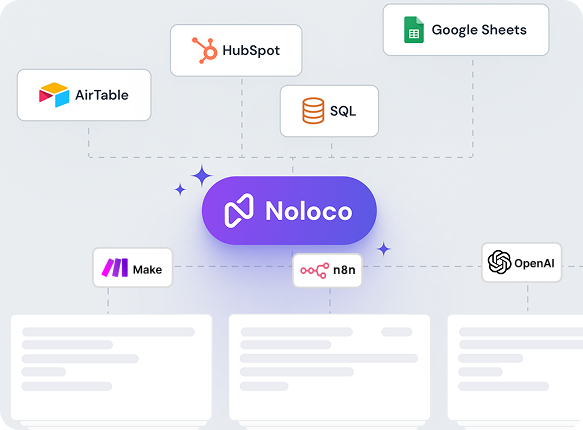
No migration needed
Noloco connects to your existing Airtable bases with live two-way sync. Your tables, linked records, and formulas stay exactly as they are.
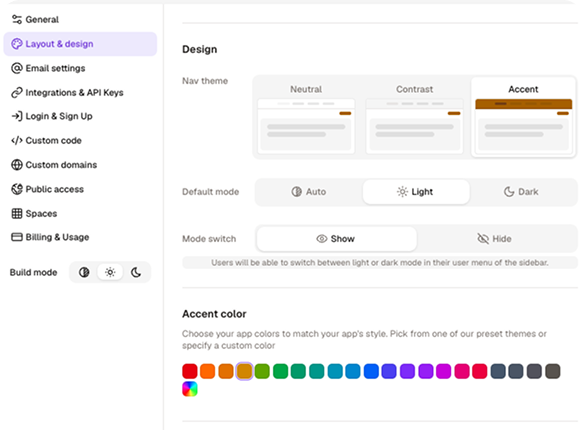
Customize your app
Add your logo, set your colours, configure what each user can see and do, all without writing a single line of code.
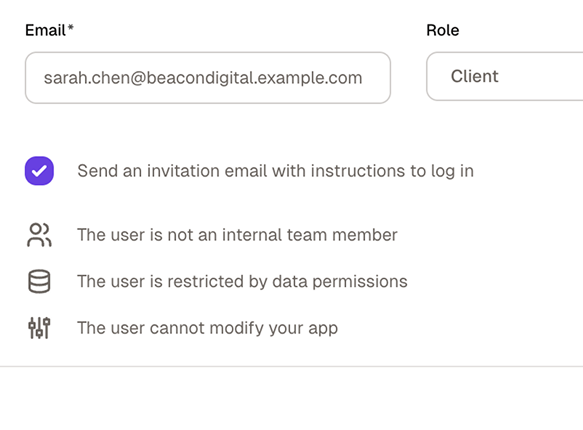
Invite your team and clients
Publish your app, assign roles, and send invitations. Everyone sees exactly what they need — and nothing they don't.
No credit card required
Still have questions?
Here are the ones we hear most.
What’s the difference between Airtable Interface Designer and Noloco?
+
-
Airtable Interface Designer lets you build internal views and dashboards on top of your Airtable data. It’s designed for teams who want to create filtered views, summary dashboards, or simple data-entry forms within Airtable, without sharing raw base access.
Noloco is a full app builder. It connects to your Airtable base with live sync and lets you build a complete application on top of it: custom navigation, branded design, row-level permissions, external user access, mobile support, multi-step workflows, and action buttons.
The data stays in Airtable. The app is in Noloco.
Can I use Noloco without migrating away from Airtable?
+
-
Yes. Noloco connects to your existing Airtable base via two-way sync — your data stays in Airtable, and your team keeps working there exactly as before.
Noloco adds the portal layer on top: the client-facing experience, the permissions, the branding, and the domain. You can be live with a client portal without touching your Airtable setup.
We've hit the 3-interface limit on the Team plan but don't want to pay for Business just to unlock more interfaces. What are our options?
+
-
Upgrading to Business solves the interface limit but doubles your per-seat cost — a significant jump for what is essentially a structural cap rather than a capability gap.
Noloco is the alternative most teams in this position use: it connects to your Airtable base and lets you build as many views, pages, and role configurations as your operation requires, with no equivalent interface limit. Your Airtable base stays on the Team plan; Noloco handles the application layer on top.
Is Airtable's per-user record filtering actually secure?
+
-
Airtable's per-user filtering in Interfaces controls what records are displayed to each logged-in user — it's a frontend filter. It doesn't prevent a technically proficient user with API access to the base from accessing records beyond what the filter shows.
For strict data isolation where records are filtered at the server level before reaching the user's browser, a purpose-built portal tool with server-side permissions is required. Noloco applies row-level security at the server level — records a user isn't permitted to see are never sent to their browser.
We have 15 people across different departments. How do we stop everyone from seeing data they shouldn't in Airtable?
+
-
Airtable's permission model handles broad role separation at the base level but doesn't natively restrict which specific records a user can see based on ownership. Building that in Airtable means separate bases per function or carefully maintained Interface configurations per role — both create ongoing maintenance overhead.
Noloco's role-based permission system handles this automatically: define roles once (Account Manager, Finance, Admin, Client), and every user gets the right access across every page of the app. Record-level isolation is applied server-side — not through a display filter that needs updating every time your base structure changes.
Why would a professional services firm use Noloco instead of Airtable Interfaces?
+
-
Three main reasons.
First, the portal looks like their product: custom domain, full branding, not Airtable's UI.
Second, permissions work automatically at scale: roles are defined once and applied everywhere, and each client sees only their own records without per-page filter configuration.
Third, the cost doesn't grow with their client count: Noloco's flat monthly fee bundles client seats in, whereas Airtable Portals are a separate paid add-on priced per seat bundle.
Can Noloco replace Airtable entirely?
+
-
It depends on how you use Airtable. Noloco includes its own built-in database (Noloco Tables) with relational data support, so teams that primarily use Airtable as a backend database can fully consolidate into Noloco.
Many teams prefer using both together: Airtable as the backend and Noloco as the front-end experience for clients, partners, or internal teams.
We have 30+ clients and the Airtable Portals seat costs are adding up. Is there a way to give clients access without the per-seat billing?
+
-
Airtable Portals are priced per seat bundle — costs scale directly with your client count. Noloco uses a flat monthly fee with client seats bundled in, so your bill doesn't grow as you add new clients until you reach your plan threshold.
Each client logs into a branded portal at your domain, sees only their own records automatically, and can submit forms, approve deliverables, and take actions — without an Airtable account and without adding to your Portals seat count.
How long does it take to connect Airtable to Noloco and build a first app?
+
-
Most teams connect their Airtable base and have a working app in under an hour. Noloco reads your Airtable schema and auto-generates pages for each table, so you’re not starting from a blank canvas. You then customize layouts, set permissions, and apply your branding.
For a basic client portal (login, record list, detail page) plan for 1-2 hours of setup. More complex apps with custom workflows take longer, but Noloco’s template library covers the common starting points.
Can I try Noloco for free?
+
-
Yes. Noloco offers a 14-day free trial, which includes full access to the features on your selected plan. This allows your team to fully evaluate workflows, permissions, automations, and integrations. No credit card is required to get started.
Our Airtable seat count keeps growing as we hire. How do we stop paying for every person who touches the base?
+
-
The per-seat model punishes growth — every new hire, contractor, or stakeholder who needs edit access adds to the bill. The most effective fix is separating what actually needs to happen in Airtable from what can happen in a portal layer on top.
With Noloco, your core team works in Airtable as editors. Everyone else (clients, contractors, stakeholders who need to view data or take specific actions) logs into Noloco instead. Noloco's flat monthly fee includes client seats, so adding users on that side doesn't increase your Airtable bill.
What can Noloco do that Airtable Interface Designer can’t?
+
-
— Custom domain and full white-label branding: your app looks like your product, not Airtable’s
— Row-level and field-level permissions: each user sees only what they’re allowed to see
—External user access included: no Portals add-on required
—Native mobile app (PWA): installable on iOS and Android with a real mobile experience
— Multi-step workflows and action buttons: automations triggered from within the app, not just in the base
—Unlimited interfaces on all plans: not dependent on your Airtable plan tier
— Charts and dashboards: built natively into your app layout
— Multi-source data: connect Airtable, GoogleSheets, PostgreSQL, and more in the same app
Why do teams switch from Airtable Interface Designer to Noloco?
+
-
The most common triggers:
— They need to give clients or partners access and don’t want to pay the Portals add-on
— They want a branded app with their own domain and logo
— They’ve hit the interface limit on their Airtable plan
— They need row-level permissions, not just view-level
— They want a realmobile experience for their team or clients
— They want workflows and automations that are part of the app interface, not hidden in the Airtable base
Hitting Airtable's limits? Some are easier to solve than others.
Noloco connects to your existing base and handles the parts that don't scale well natively — client access, permissions, branding, multiple bases in one app.