EnterprisePricing

A real estate firm set up a client portal to manage offers, NDAs, and property documents in one place. They sent the login link to a buyer. Two days later that buyer replied asking why they could see another buyer's offer on the same property.
No system was hacked. No data was stolen. The portal was simply not configured correctly. And in a transaction where trust and confidentiality are the foundation of the relationship, that one moment was enough to derail the deal.
Real estate firms handle some of the most sensitive documents in any client relationship: offer letters, NDAs, title documents, financial disclosures, and contracts worth hundreds of thousands or millions of dollars. Getting access control right is not optional. It is the difference between a portal that protects your clients and one that exposes them.
TL;DR
- Role-Based Access Control (RBAC) means each person who logs into your portal sees only what their role allows. Buyers see their own offers and documents. Sellers see their own listings. Your team sees what they need to manage transactions.
- Business email compromise schemes targeting real estate transactions cost firms around $446 million in 2024, according to the FBI. A misconfigured portal is one of the most common entry points.
- A real estate firm needs at least five roles: buyer, seller, external partner (solicitor, surveyor, lender), agent, and admin.
- The five most common permission misconfigurations in real estate portals are covered below, with a plain-language fix for each.
- Testing your permissions by logging in as a dummy client account before go-live takes 20 minutes and catches most problems before a real client finds them.
What does Role-Based Access Control (RBAC) actually mean for a real estate team?
Role-Based Access Control is just a formal name for something every real estate professional already understands intuitively: not everyone involved in a transaction should see everything about that transaction.
Your buyer should see their own offer, their own documents, and their own viewing schedule. They should not see the seller's reserve price, the other buyer's competing offer, or your team's internal notes about the vendor's urgency to sell. Your seller should see their own listing documents and accepted offer status. They should not see your agent's commission calculations or the buyer's financial pre-approval details.
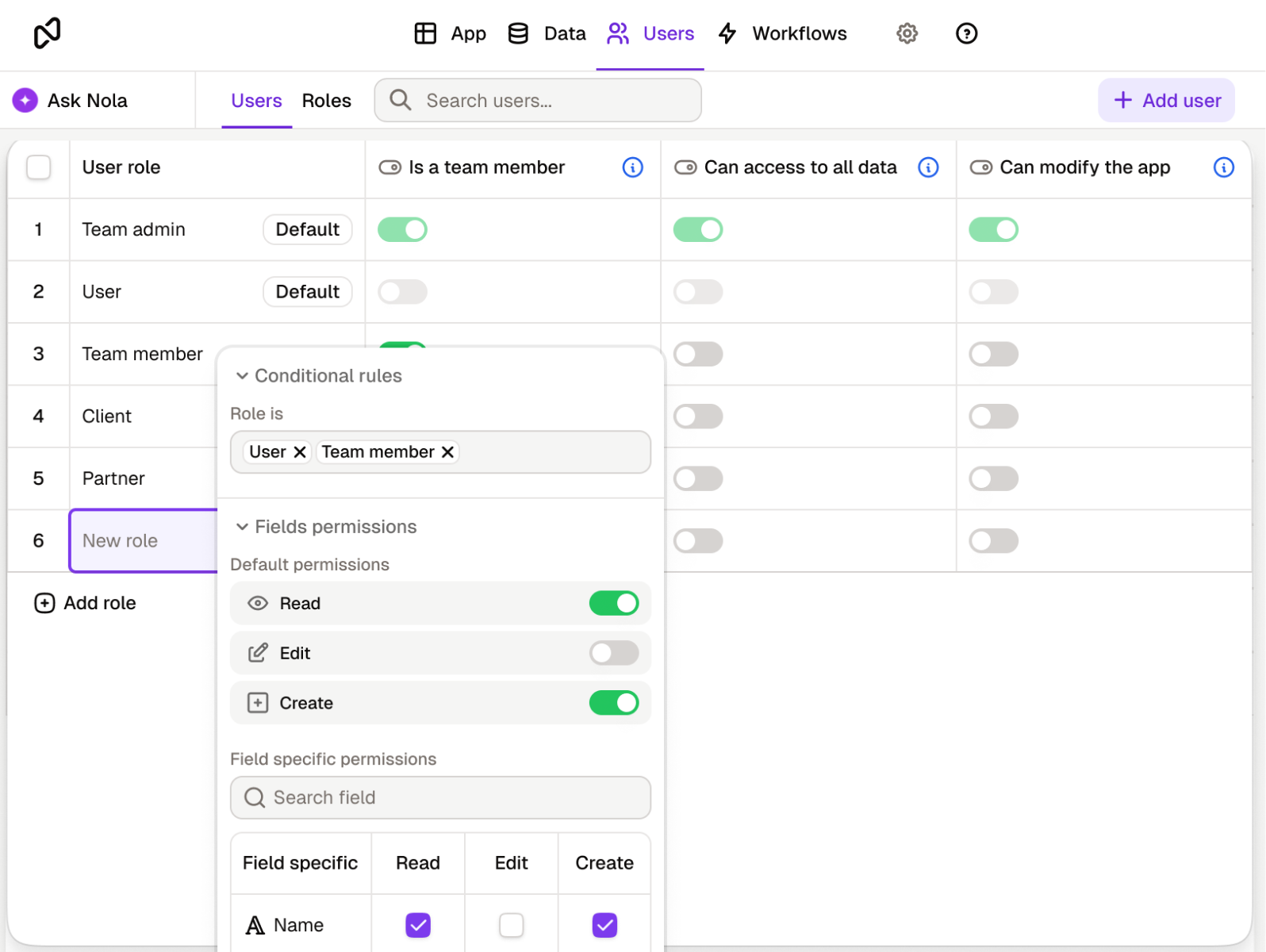
RBAC is how you enforce those boundaries systematically, without having to manage access file by file or person by person. You define a role once (buyer, seller, agent, partner), assign permissions to that role, and every person in it automatically gets the right access. When someone's role in a transaction changes, or when a deal closes and their access should end, you update the role and it applies everywhere at once.
Applied to a real estate client portal, this means every party in a transaction logs in and sees a version of the portal built specifically for their role in that deal. Nothing more, nothing less.
What roles does a real estate firm actually need in a client portal?
Real estate transactions involve more parties than most industries. Your portal needs to account for all of them. Here is what a typical firm managing residential or commercial transactions needs, and what each role should and should not see.
A few things are worth spelling out about this table. First, buyers and sellers in the same transaction should never see each other's confidential information. A buyer should not see the seller's reserve price or motivation to sell. A seller should not see a buyer's financial pre-approval details or competing offer comparisons. These are legally sensitive and commercially damaging if exposed, even accidentally.
Second, external partners like solicitors, surveyors, and lenders need access to specific documents to do their job, but nothing beyond that. A solicitor handling the conveyancing does not need to see your internal CRM notes, the agent's commission split, or the marketing performance of the listing. Build a dedicated external partner view that shows only what is relevant to their role in the deal.
Third, agents should only see deals they are assigned to by default. If your firm handles sensitive commercial transactions where one agent should not know the terms of another agent's deal, enforce that at the record level, not just the page level.
What are the most common permission misconfigurations in real estate portals, and how do you fix them?
The most dangerous permission problems in real estate portals are rarely the result of a cyberattack. They are the result of a portal that was set up quickly and never fully tested from the client's point of view. Here are the five that come up most often.
The risk in real estate is not hypothetical. According to Group IB's Hi Tech Crime Trends report, real estate suffered 553 ransomware breaches in 2024, placing it second across all industries, behind only manufacturing. And according to the FBI, business email compromise schemes targeting real estate transactions cost firms around $446 million in 2024 alone. Weak access controls are one of the most exploited vulnerabilities. A portal that leaks one buyer's offer to another is not just an embarrassing misconfiguration. It is a liability.
How do you handle document sharing and NDAs securely inside a real estate portal?
Document sharing in real estate is more sensitive than in most industries. An offer letter shared with the wrong party can compromise a negotiation. An NDA shared without the right access controls is functionally useless as a confidentiality measure. A title document or financial disclosure exposed to the wrong person can create legal exposure for your firm.
The principle is the same as role permissions but applied to individual documents. Every document shared through the portal should be visible only to the specific people who need it for their role in that transaction. A buyer's NDA should be visible to that buyer, their solicitor (if applicable), and the relevant agent. Nobody else.
In practice this means three things. First, documents should be attached to transaction records, not uploaded to a general shared folder. A shared folder with permission settings is always one misconfiguration away from becoming visible to everyone. Attaching a document to a specific transaction record, and filtering that record by role, is a more reliable structure. Second, download permissions should be set separately from view permissions. A solicitor may need to download a title document. A buyer browsing their offer status may only need to view it on screen. Distinguish between the two. Third, when a document is updated (a revised offer, an amended contract), the old version should be clearly superseded in the portal so no party acts on outdated information.
How do you test your permissions before clients find the gaps?
Before you invite any real client into a real estate portal, spend 20 minutes testing it as each type of user.
Create a dummy buyer account and log in. Try to navigate to a document that belongs to a different buyer. Try to open a record linked to a different transaction. Try to view the agent's internal notes. If any of those are accessible, the permissions are not correctly configured. Then log in as a dummy seller account and do the same. Then test the external partner account: can the dummy solicitor see anything beyond the documents you explicitly shared with them?
The most common finding in real estate portals: the record filter is set on the wrong field. The view is filtered by "client name" but the field used is a free-text label, not a linked user record, so the filter does not actually restrict access the way you intended. This takes five minutes to fix when you catch it in testing. It takes significantly longer to fix after a buyer has already seen something they should not have.
One additional check specific to real estate: test what happens at the end of a transaction. Log in as the dummy buyer account after marking the deal as closed. Can they still access documents? If yes, build a process to deactivate or restrict access on deal close. Client data from a completed transaction should not remain openly accessible indefinitely.
What does a secure real estate portal look like when it is working correctly?
A buyer logs in and sees their property shortlist, their submitted offer, their NDA, and the current status of their transaction. Nothing from any other buyer's file is visible. They can upload a requested document, check whether their solicitor has received what they need, and see whether the seller has responded. They never have to email the agent to ask for an update, because the update is already there.
The seller logs in and sees their listing documents, the accepted offer status, and the next steps in the conveyancing process. They do not see competing buyers, commission details, or internal agent notes about the transaction.
The solicitor logs in and sees only the title documents and correspondence relevant to the transaction they are handling. Nothing from other deals. Nothing from other clients of the firm.
The agent sees everything relevant to their assigned deals: all documents, all offers, all parties, all internal notes. They can update statuses, share new documents with specific parties, and move the transaction forward without sending a single email attachment.
That is what a correctly configured real estate client portal looks like. It is not a technical achievement. It is a configuration task that any operations-minded person in the firm can set up in an afternoon, once they know what to configure and in what order.
What should you check before inviting your first client into a real estate portal?
Work through this list before you send any buyer, seller, or external partner a login link.
- At least five roles defined before anyone is invited: buyer, seller, external partner, agent, admin
- Record-level filters active on all client-facing views, not just page-level restrictions
- Documents attached to transaction records, not stored in a general shared folder
- No internal fields (agent notes, commission data, internal valuations) visible in any client or partner view
- External partner view contains only the documents explicitly shared for their role in the deal
- Individual logins per person, including couples and business partners buying or selling together
- A dummy account tested for each role before any real client is invited
- A process in place to deactivate or restrict access when a deal closes or falls through
- A quarterly access review scheduled to catch any logins that should have been deactivated
- At least one named admin who owns the permissions configuration and is responsible for access reviews
Final thoughts
Real estate transactions move on trust. A buyer who discovers their offer was visible to a competing buyer does not just lose confidence in your portal. They lose confidence in your firm. That is a client relationship that rarely recovers.
Getting permissions right in a real estate client portal is not a technical project. It is a configuration task that protects the confidentiality your clients assume you are already providing. The roles, the record filters, the document access controls, and the quarterly review: those four things, done correctly, are the whole system.
If you are building or upgrading a client portal for your real estate team and want to see how role-based permissions, transaction-level document sharing, and access controls work in practice, Noloco lets you configure all of this without writing a line of code. See the Noloco client portal solution page for a full walkthrough.
Frequently asked questions
Can a buyer in my portal see another buyer's offer on the same property?
Only if your permissions are misconfigured. With correctly set record-level filters, each buyer logs in and sees only the records linked to their own account. They cannot navigate to another buyer's offer, even on the same property. This is one of the most important things to test before inviting any real client into the portal.
Should solicitors and surveyors have the same access level as clients?
No. External partners like solicitors, surveyors, and lenders need access to specific documents to do their job, but nothing beyond that. Create a dedicated external partner role that shows only the documents explicitly shared for their involvement in the transaction. They should not see client financial details, internal agent notes, or any records from other transactions.
What happens to a client's portal access when a deal closes?
In most portal setups, nothing changes automatically. The client's login remains active until someone manually deactivates it. Build a process to restrict or deactivate access when a transaction closes or falls through. A quarterly access review is enough to catch any logins that should have been turned off but were not.
Do buyers and sellers in the same transaction need separate logins?
Yes, always. They have different roles in the transaction and should see different information. A seller should never see a buyer's financial pre-approval or offer strategy, and a buyer should never see the seller's reserve price or motivation to sell. Separate roles and separate logins are the only way to enforce that reliably.
How do I make sure an NDA shared through the portal stays confidential?
Attach the NDA to the specific transaction record it belongs to and set the visibility to the relevant parties only: the signing client, their solicitor if applicable, and the agent managing the deal. Do not upload it to a general shared folder. Folder-level permissions are easier to misconfigure than record-level permissions, and the consequences in a transaction context are much harder to manage.
How many roles does a real estate firm typically need in a client portal?
Most firms need at least five: buyer, seller, external partner (solicitor, surveyor, or lender), agent, and admin. Larger firms with multiple teams or transaction types may need additional sub-roles, for example separating residential agents from commercial agents, or distinguishing between a viewing-only client and an active buyer in negotiation. Start with five and add roles only when a real operational need requires it.
Related resources
What is a client portal? A primer on what client portals are, why service firms use them, and what to look for when choosing one.
How Role-Based Access Control (RBAC) secures your client portal. The professional services version of this article, with role examples for agencies, consultancies, and advisory firms.
Noloco client portal solution page. See how Noloco lets service teams build branded, secure client portals without code.
Author



Our recent posts
Explore all blog posts



Your most common
questions—answered!
Who is Noloco best suited to?
+
-
Noloco is perfect for small to medium-sized service businesses like consultancies, agencies, advisory firms, as well as engineering and industrial services such as energy, construction, or any other operations-focused fields.
Do I need tech experience to use the platform?
+
-
Not at all! Noloco is designed especially for non-tech teams. Simply build your custom system using a drag-and-drop interface. No developers needed!
Is my data secure?
+
-
Absolutely! Security is very important to us. Our access control features let you limit who can see certain data, so only the right people can access sensitive information
Do you offer customer support?
+
-
Yes! We provide customer support through various channels—like chat, email, and help articles—to assist you in any way we can.
My business is growing fast—can Noloco keep up?
+
-
Definitely! Noloco makes it easy to tweak your system as your business grows, adapting to your changing workflows and needs.
Is there any training or support available to help my team get up to speed?
+
-
Yes! We offer tutorials, guides, and AI assistance to help you and your team learn how to use Noloco quickly.
Can I make changes to my app after it’s been created?
+
-
Of course! You can adjust your app whenever needed. Add new features, redesign the layout, or make any other changes you need—you’re in full control.
Ready to boost
your business?
Build your custom tool with Noloco