EnterprisePricing

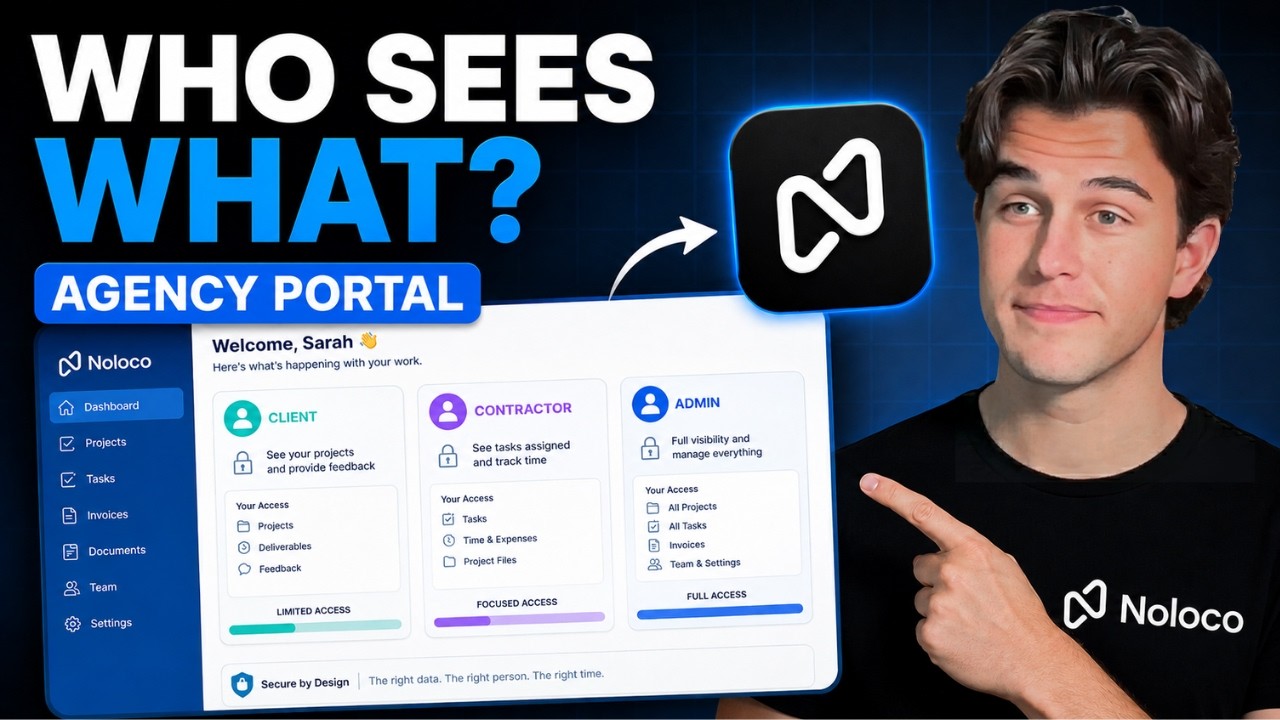
What makes a good operating system? One place where clients, contractors, and your team get work done, and where robust client portal permissions decide who sees what. Finding a single platform to run work across teams and clients is rare, and getting it wrong gets expensive in more ways than one. Most businesses either pay up for a plan that gives more people access, or they settle for a poorly configured system and sacrifice their data security. Both are costly. Both are preventable with a well-built operating system.
TL;DR
- A good operating system shows the right information, to the right person, at the right time, so they can take the next right action.
- Client portal permissions are the foundation. Without them, "hiding" data with a filter still send every record to the user's browser.
- We walk through 3 views of the same system: the client (Sarah), the contractor (Sandy), and the owner (Sam). Each person sees a different slice of the same data.
- In Noloco, permissions live at the data layer, so records outside a user's role never reach their device. Security comes built into the build experience.
- The payoff: fewer "where's my project?" emails, no waiting on an admin to grant access, and an app that grows with the business.
Watch the video breakdown:
We define a well-built operating system with a simple framework: show the right information, to the right person, at the right time, so they can take the next right action. It can look like a client portal, a project management app, or a mix of features only your business needs. Whatever it looks like, one thing has to be true. It has to be secure. What seems sleek on the outside might be exposing important data that's a few clicks away.
Why client portal permissions beat security by obscurity
Hiding data instead of configuring real permissions has a name: "security by obscurity." It's the difference between using a filter to shape an interface and restricting access to the dataset by the user's role. A filter controls what shows up on the screen, but it doesn't change what gets delivered to the device.
This matters if you have external users, like clients or contractors, interacting with your operating system. If you narrow a contractor's view with a filter alone, the data still gets sent to their browser. Anyone comfortable opening the developer tools can read what arrived, including the rows hidden from the screen. Client portal permissions work at the data layer, so records outside a user's role never reach their device in the first place.
Once that foundation is in place, you can apply the framework to each person's experience. Let's see it across 3 scenarios: the client, the contractor, and the owner.
Scenario 1: The Client
When a client enters your operating system, they need to see their deliverables. Sarah, a client of a marketing agency, opens her portal from her phone and lands on a gallery of active projects. She clicks into one and sees the timeline, the progress, and the open items. If something needs her input, she leaves a comment and the team gets notified.
The alternative? Sarah digs through her email for the last mention of the project, then remembers the agency runs everything through Slack. She finally finds a link to an external project tool, only to get denied access to the workspace. It's these small moments, over and over, that make a client less likely to renew. On the other hand, removing friction for your clients allows them to focus on the quality of your deliverables. When the system is as sharp as you are, clients are more likely to renew.
Scenario 2: The Contractor
External contributors, contractors in this agency's case, only need to see the projects and tasks assigned to them. Everything else stays out of view: other projects, client details, financials. A contractor named Sandy opens her portal and lands on the work that's hers to do.
Sandy can open the same project Sarah sees, but with more permissions. Instead of just viewing, she can change a task's status, update project health, and log time and expenses. Since all the communication lives in one place, she reads Sarah's comment and keeps working. No waiting on an admin to grant anyone access.
This is exactly where security by obscurity comes into play. If Sandy's view is filtered instead of permissioned, the records she shouldn't see still arrive on her device. Anyone who opens the developer tools can read them. Permissions at the data layer mean those rows never get sent.
Scenario 3: The Owner
Leaders need to know everything, just not all at once. Raw data and cluttered dashboards are overwhelming. So Sam, the owner, only sees the right data when he opens his dashboard from his phone first thing in the morning.
Today Sam needs to read his team's workload. Who's at capacity, who has room to take on a new account? One dashboard shows how his team is spent across the business. He taps over to a list of at-risk projects and overdue tasks, clicks into the assignee, and requests an update. Same with outstanding invoices, the lifeblood of the business, all in one place.
How client portal permissions work in Noloco
When you build with no-code and AI, it's easy to design a pretty dashboard and forget the data underneath it. In Noloco, security comes built into the building experience, so you can scale your app without heavy development every time something changes. Building with Noloco is safer, and it’s easier. When the business grows, the app grows with it.
Three pieces do the work:
- Permissions control the data sent to a user's device, at the record and field level.
- Conditional visibility gets configured right next to the interface design.
- User roles are titles assigned to users that enforce those permissions, configured in the same place.
And because the same engine runs your workflows, a client action can move work forward on its own. When Sarah approves a deliverable, a Noloco workflow can update the project and notify the right person automatically. No one has to notice the approval and process it by hand.
So, what makes a good operating system? Sarah finds her deliverables in 2 taps. Sandy updates her tasks without waiting on anyone. Sam reads the whole business over his morning coffee. When you show the right information, to the right person, at the right time, so they can take the next right action, work actually gets done.
Frequently asked questions
What are client portal permissions?
Client portal permissions are the rules that decide which data each user can see and act on inside your portal, based on their role. Done right, they work at the data layer, so a user's device only ever receives the records their role allows.
What is security by obscurity?
Security by obscurity is hiding data with a filter instead of restricting access to it. The data still gets sent to the browser, where anyone willing to open the developer tools can read it. Real permissions stop the data at the source, so it's never delivered in the first place.
What's the difference between a filter and a permission?
A filter controls what shows up on the screen. A permission controls what gets sent to the device. You can filter a contractor's view down to one project, but if the other records still ship to their browser, they're exposed. Permissions keep those records off the device entirely.
Can one portal serve clients, contractors, and the owner securely?
Yes. That's the point of role-based client portal permissions. The same project record can show a client their deliverables, give a contractor edit access, and feed the owner financials, with each role seeing only its own slice.
Do permissions slow down building the app?
In Noloco, no. Roles, conditional visibility, and permissions get configured right next to the interface as you build. You handle security while you build the app, in the same place.
Ready to build yours?
If your client experience is held together by email threads and shared logins, a free assessment is the fastest way to see what a real operating system would look like for your business. This post was co-authored with Internyl, who engineer operations systems, business apps, and automations that allow teams to move with agility and clarity. In less than 10 days, you walk away with a requirements doc, a build plan, and a fixed-cost proposal. It's free, and it's yours to keep.
Book a scoping sprint with Internyl.
Author


Our recent posts
Explore all blog posts


Your most common
questions—answered!
Who is Noloco best suited to?
+
-
Noloco is perfect for small to medium-sized service businesses like consultancies, agencies, advisory firms, as well as engineering and industrial services such as energy, construction, or any other operations-focused fields.
Do I need tech experience to use the platform?
+
-
Not at all! Noloco is designed especially for non-tech teams. Simply build your custom system using a drag-and-drop interface. No developers needed!
Is my data secure?
+
-
Absolutely! Security is very important to us. Our access control features let you limit who can see certain data, so only the right people can access sensitive information
Do you offer customer support?
+
-
Yes! We provide customer support through various channels—like chat, email, and help articles—to assist you in any way we can.
My business is growing fast—can Noloco keep up?
+
-
Definitely! Noloco makes it easy to tweak your system as your business grows, adapting to your changing workflows and needs.
Is there any training or support available to help my team get up to speed?
+
-
Yes! We offer tutorials, guides, and AI assistance to help you and your team learn how to use Noloco quickly.
Can I make changes to my app after it’s been created?
+
-
Of course! You can adjust your app whenever needed. Add new features, redesign the layout, or make any other changes you need—you’re in full control.
Ready to boost
your business?
Build your custom tool with Noloco