EnterprisePricing


Your Airtable base runs the business. It holds every client, every project, every invoice status, and a handful of automations nobody wants to touch. Now clients want their own login, your team keeps asking for views that only show their work, and since Airtable changed owners, someone in leadership has asked whether you should be "looking at options."
The usual answer is a migration: pick a new tool, export everything, rebuild it, and switch over on a set date. For an operations lead, that plan carries a real risk of breaking the thing that currently works. There's a smaller way to start. You can keep Airtable exactly where it is, put a portal on top of it, and decide later, table by table, whether anything needs to move at all. Keep reading and simply follow the four simple steps below.
TL;DR
- You don't need to leave Airtable in one go. Connect your existing bases to a portal builder and keep working with the same data.
- Step 1: connect your Airtable bases. Step 2: describe the portal you need and let AI build it. Step 3: decide who sees and edits what. Step 4: move tables one at a time, or keep Airtable as your data source for good.
- Edits made in the portal write straight back to Airtable, so your team can keep using the base they know while clients and partners use the portal.
- Airtable's new owner, Bending Spoons, says plans and prices are unchanged. A step-by-step approach lets you react if that changes, without betting the business on one switchover date.
- Big platform migrations often run late: in a 2025 survey of IT leaders, 61% said migration fatigue delayed projects by six months or more.
What has changed for businesses running on Airtable?
Two things are happening at once. The first is old: the base was built for your team, and now other people need in. Clients want to see their project status and upload documents. Subcontractors need to see their jobs and nothing else. Giving each of them safe, limited access inside Airtable means building filtered views and paying for extra seats as the list grows. We cover where that strains in detail in Airtable client portal permissions.
The second is new. Bending Spoons agreed to buy Airtable on August 4, 2026, and completed the acquisition on September 4, 2026 (Bending Spoons, 2026). On October 12, Airtable said it was "parting ways with a large portion of the pre-acquisition team", while also saying that "for customers, nothing changes regarding your plan, price, or service offering" (Airtable, 2026).
That's not a reason to panic, and nothing has broken. But it does make operations leads ask a fair question: if we ever had to change, how hard would it be? If you want the full background, read what the Bending Spoons acquisition means for Airtable customers.
What's the risk of moving off Airtable all at once?
A full switch means freezing changes, exporting every table, rebuilding links between them, recreating automations, retraining the team, and picking a cutover date. If anything is missed, invoices go out wrong or a client sees a broken page on day one.
Large platform moves rarely go to plan. In CloudBees' 2025 DevOps Migration Index, a survey of more than 300 enterprise IT leaders, 61% said migration fatigue had delayed projects by six months or more, and the average project went 18% over budget (CIO Dive, 2025). Those are big companies with IT departments. A 40-person firm with one person who understands the base has even less room for a long, messy switch.
The step-by-step approach below removes the cutover date. Nothing gets switched off. You add a portal on top of what you have, and only move data when there's a clear reason to.
The four steps below use two kinds of business as examples: a 40-person consultancy that wants a client portal, and a scaffolding contractor that needs a portal for its subcontractors.
Step 1: How do you connect your Airtable bases?
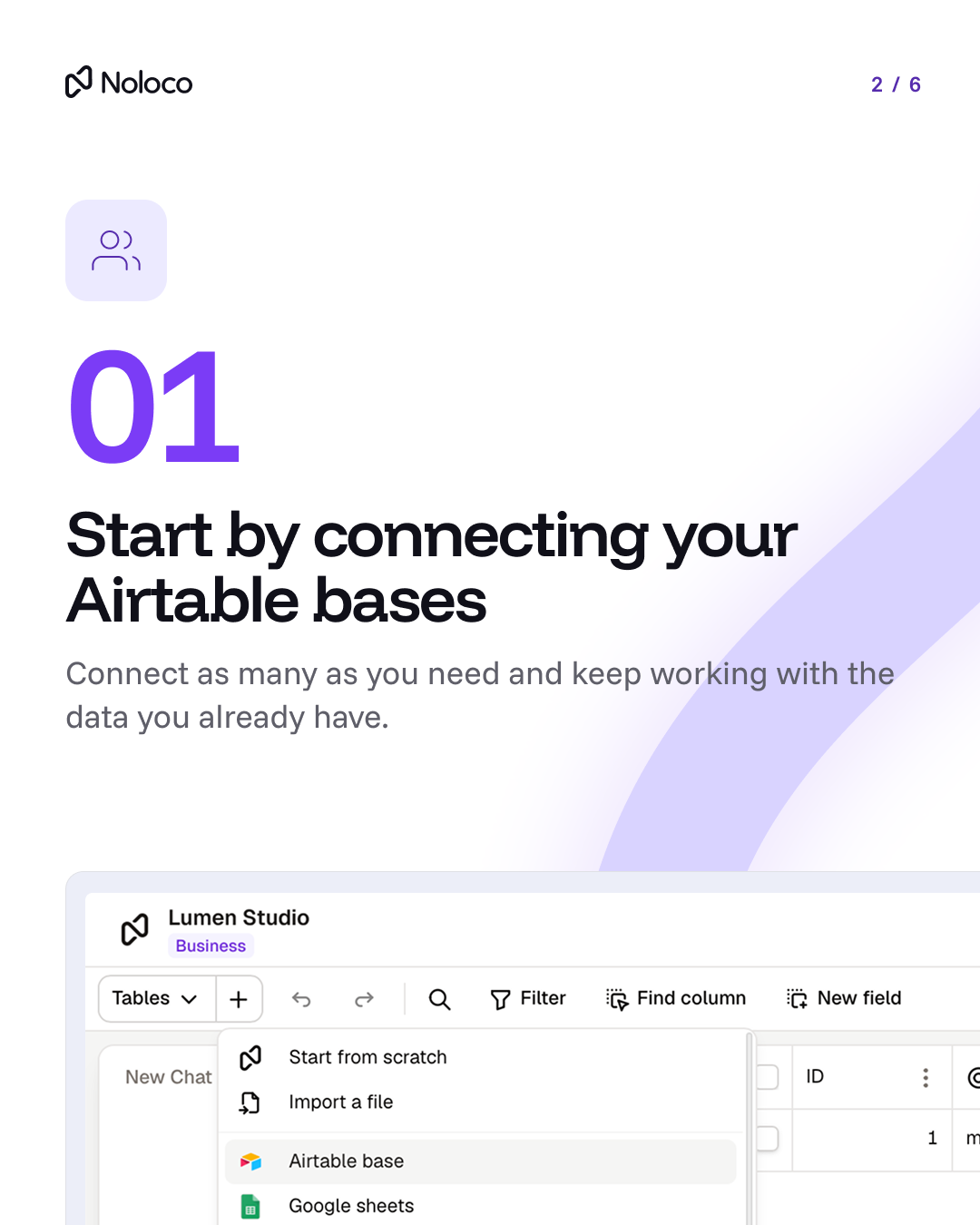
Start by connecting the bases you already use. In Noloco, you add an Airtable base as a data source, pick the tables you want, and they appear in your app with the same records and links between them. You can connect several bases to the same app, so the consultancy's Clients base and its Billing base can sit side by side.
The sync works both ways. When someone updates a record in the portal, the change shows up in Airtable straight away. When someone edits Airtable directly, or an Airtable automation runs, the change appears in Noloco within about two minutes, according to Noloco's Airtable setup guide. Your team can carry on working in the base exactly as before.
Step 2: How do you build the portal your business needs?
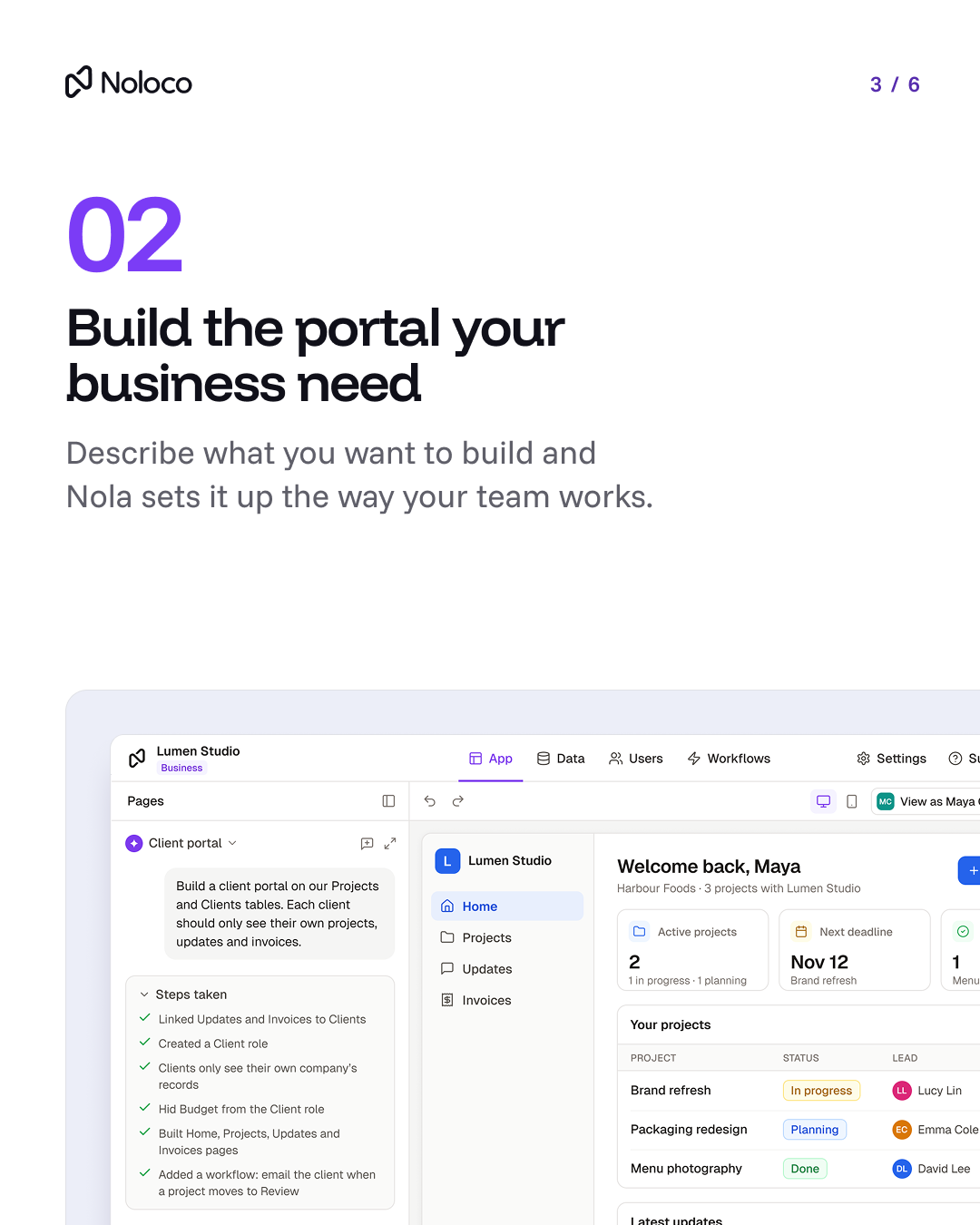
Next, tell Nola, Noloco's AI builder, what you want in plain language. The consultancy might type: "Build a client portal on our Projects and Clients tables. Each client should only see their own projects, updates, and invoices."
Nola links the right tables, creates a Client role, hides fields like Budget from clients, builds Home, Projects, Updates, and Invoices pages, and can add a workflow such as "email the client when a project moves to Review." You then check it, change what you want, and preview it as a specific client before anyone logs in.
Step 3: How do you give everyone the right access?
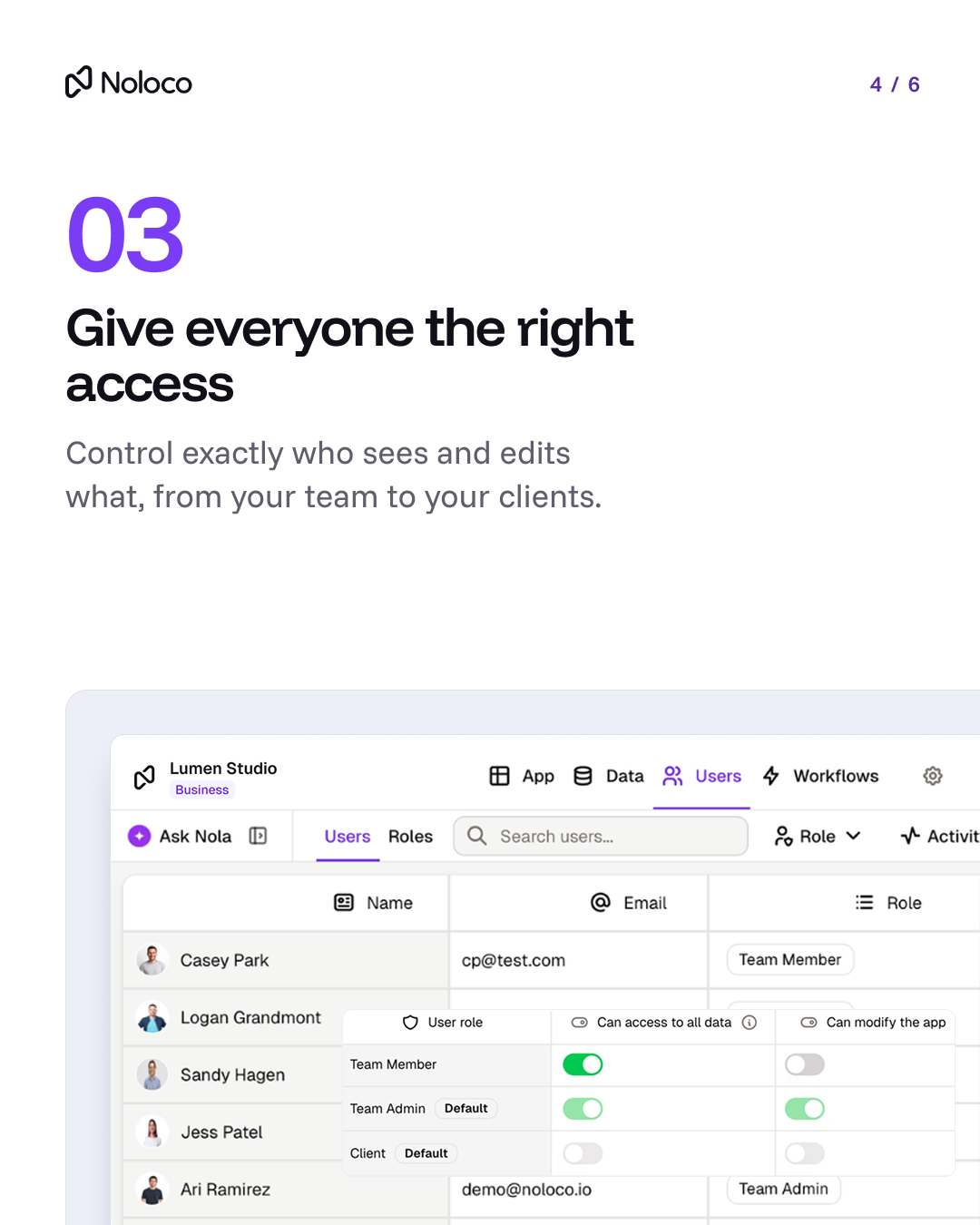
This is the part operations leads usually worry about most, and it's where a portal layer does more than Airtable views. In Noloco, you set permissions by role, down to the table, page, record, and field. For example:
- Team members can see all client data but can't change how the app is built.
- Team admins can see everything and change the app.
- Clients only see records linked to their own company, and never see internal fields like margin or notes.
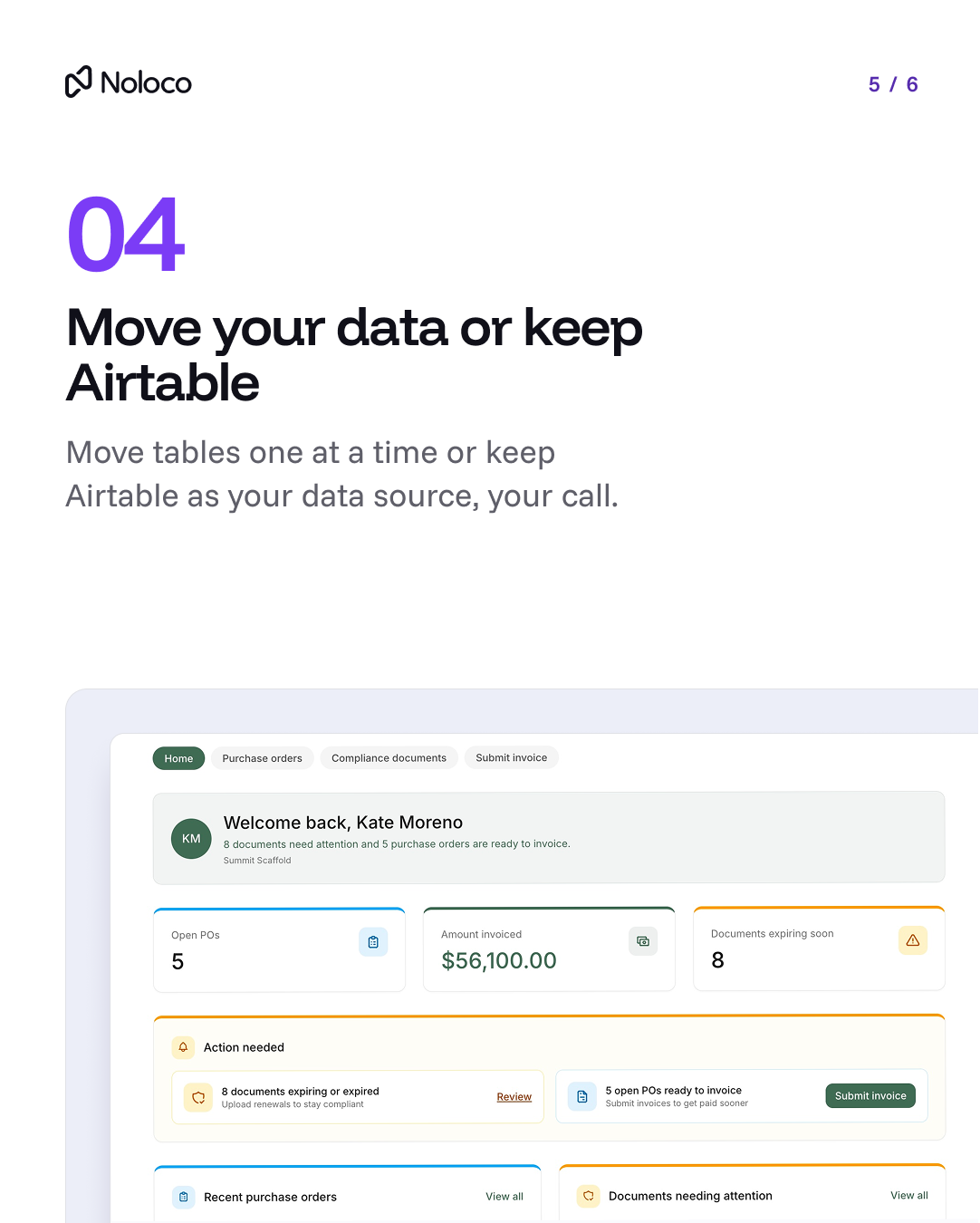
For the scaffolding contractor, a Subcontractor role means each crew sees only its own purchase orders and compliance documents. When a crew stops working with you, you turn off that one login. Nobody else's access changes.
Step 4: What happens to your data: move it or keep Airtable?
Once the portal is live, you decide what happens to the data underneath, and you can take your time. There are two valid paths:
- Keep Airtable as your data source. If the base works and your team likes it, leave it. Noloco stays the place clients, partners, and staff log in to, and Airtable keeps holding the data.
- Move tables one at a time. If a table keeps hitting limits, or you'd rather not depend on Airtable, move that one table into Noloco Tables, Noloco's built-in database, and leave the rest in Airtable. The contractor might move its compliance documents table first, because that's the one subcontractors use every week, and leave its job costing in Airtable.
Either way, the portal your clients and partners use doesn't change. They keep the same login and the same pages while the data behind them moves, or stays put.
Enpal, a solar company, runs its field sales this way: it keeps several Airtable bases as its source of truth, while sales reps, team leaders, and regional managers each work in a Noloco portal that shows only their own customers, team, or region. Read the Enpal story.
What should you check before you start?
Before connecting anything, spend an hour on these four checks. They'll save you from the most common surprises.
- List who needs access and what they need to do. "Clients approve deliverables and download invoices" is more useful than "clients need a portal."
- Find your sensitive fields. Budget, margin, internal notes, other clients' pricing. Mark them so you can hide them by role from day one.
- Note which Airtable automations other people depend on. They keep running, since the base stays in place, but you'll want to know which ones a portal workflow could replace later.
- Test as a real user. Log in as a test client and a test subcontractor before inviting anyone, and confirm they can only see their own records.
If you're comparing this to building portals inside Airtable itself, Noloco vs Airtable Interfaces walks through permissions, branding, and client access side by side. For the cost side, see Airtable pricing in 2026.
What do teams get when they move from Airtable to Noloco?
Why do teams move off Airtable?
Airtable is great for storing data. It gets harder once clients, partners, and more staff need to work in it.
Can you limit Airtable access to individual records?
Not as a rule: Airtable permissions stop at the base, interface, or view. In Noloco, each client only sees their own records, on every page.
How do clients log in without getting into your base?
In Airtable, they need a seat or the Portals add-on. In Noloco, they log in to a branded portal on your own domain.
Does adding clients increase your bill?
In Airtable, every client who can edit or comment takes a paid seat. Noloco’s Build plan includes 1,000 active clients. See pricing.
Can you run CRM, projects, and invoicing in one place?
Yes. Noloco puts CRM, projects, finance, and client portals in one app, built on your existing Airtable data.
Final thoughts
Leaving Airtable doesn't have to be one big, risky weekend. For most operations teams, the real problem isn't where the data lives; it's that clients, partners, and staff can't each get the right access to it. You can fix that first, on top of the base you already trust.
Connect your bases, build the portal, set the access rules, and only then decide whether any table should move. If Airtable keeps working for you, keep it. If one day it doesn't, you've already done most of the work.
See your own Airtable base running as a client portal. Start with your Airtable or book a demo and we'll show you what your clients would see on top of your own Airtable data, with your permissions in place, before a single record moves.
Frequently asked questions
Do I need to migrate from Airtable to add a client portal?
No. Several portal builders like Noloco connect directly to an existing Airtable base, so clients get their own login while your data stays in Airtable. You only need to move data if you choose to.
Will my Airtable automations keep working if I add a portal on top?
Yes, as long as the portal edits the same base. Records changed through the portal are written back to Airtable, so automations triggered by those changes run as usual. Check any automation that relies on a specific view or field you plan to rename.
Is my Airtable data safe after the Bending Spoons acquisition?
Airtable said on October 12, 2026 that plans, prices, and service offerings are unchanged for customers. Nothing has been switched off. It's still sensible to know which tables your business depends on most.
Can I move just one Airtable table to another tool?
Yes, if the tool can combine data from more than one source, like Noloco. You can move one table to a new database and keep the rest in Airtable, as long as the tool can still link records across both.
How do I stop clients seeing each other's data in a portal?
Use record-level permissions tied to the client's account, so each person only sees records linked to their company. Hide sensitive fields by role, then test by logging in as a client before you send any invites.
How long does it take to set up a portal on an existing Airtable base?
It depends mostly on how many roles, pages, and approval steps you need. A portal with one client role on clean, well-linked data is the quickest to build and test. Each extra role or workflow adds testing time, so start with one group of users and add the next once the first is working.
Related resources
Author


Our recent posts
Explore all blog posts



Your most common
questions—answered!
Who is Noloco best suited to?
+
-
Noloco is perfect for small to medium-sized service businesses like consultancies, agencies, advisory firms, as well as engineering and industrial services such as energy, construction, or any other operations-focused fields.
Do I need tech experience to use the platform?
+
-
Not at all! Noloco is designed especially for non-tech teams. Simply build your custom system using a drag-and-drop interface. No developers needed!
Is my data secure?
+
-
Absolutely! Security is very important to us. Our access control features let you limit who can see certain data, so only the right people can access sensitive information
Do you offer customer support?
+
-
Yes! We provide customer support through various channels—like chat, email, and help articles—to assist you in any way we can.
My business is growing fast—can Noloco keep up?
+
-
Definitely! Noloco makes it easy to tweak your system as your business grows, adapting to your changing workflows and needs.
Is there any training or support available to help my team get up to speed?
+
-
Yes! We offer tutorials, guides, and AI assistance to help you and your team learn how to use Noloco quickly.
Can I make changes to my app after it’s been created?
+
-
Of course! You can adjust your app whenever needed. Add new features, redesign the layout, or make any other changes you need—you’re in full control.
Ready to boost
your business?
Build your custom tool with Noloco