
Operations management
Your operations are complex. Your tools should keep up.
Connect your existing data and build the request trackers, approval flows, inventory and dashboards your operation needs, with AI. One place to manage work, instead of spreadsheets, email threads and a pile of single-purpose tools.
- ISO 27001 certified
- Works on mobile
- Free to start
Why Noloco
Why operations teams build on Noloco
Build what you need, fast
Describe the tracker, portal or dashboard you need and Nola, the Noloco AI assistant, builds it. Then change anything yourself with point and click, without waiting on developers.
On the data you already have
Import from Excel or Google Sheets, or build on top of Airtable, HubSpot, Postgres and more. No migration project, and one source of truth for every team.
Fewer tools to manage
Replace the spreadsheets, inboxes and single-purpose apps your processes are spread across with one app, shaped around how your business actually runs.
Use cases
How operations teams use Noloco
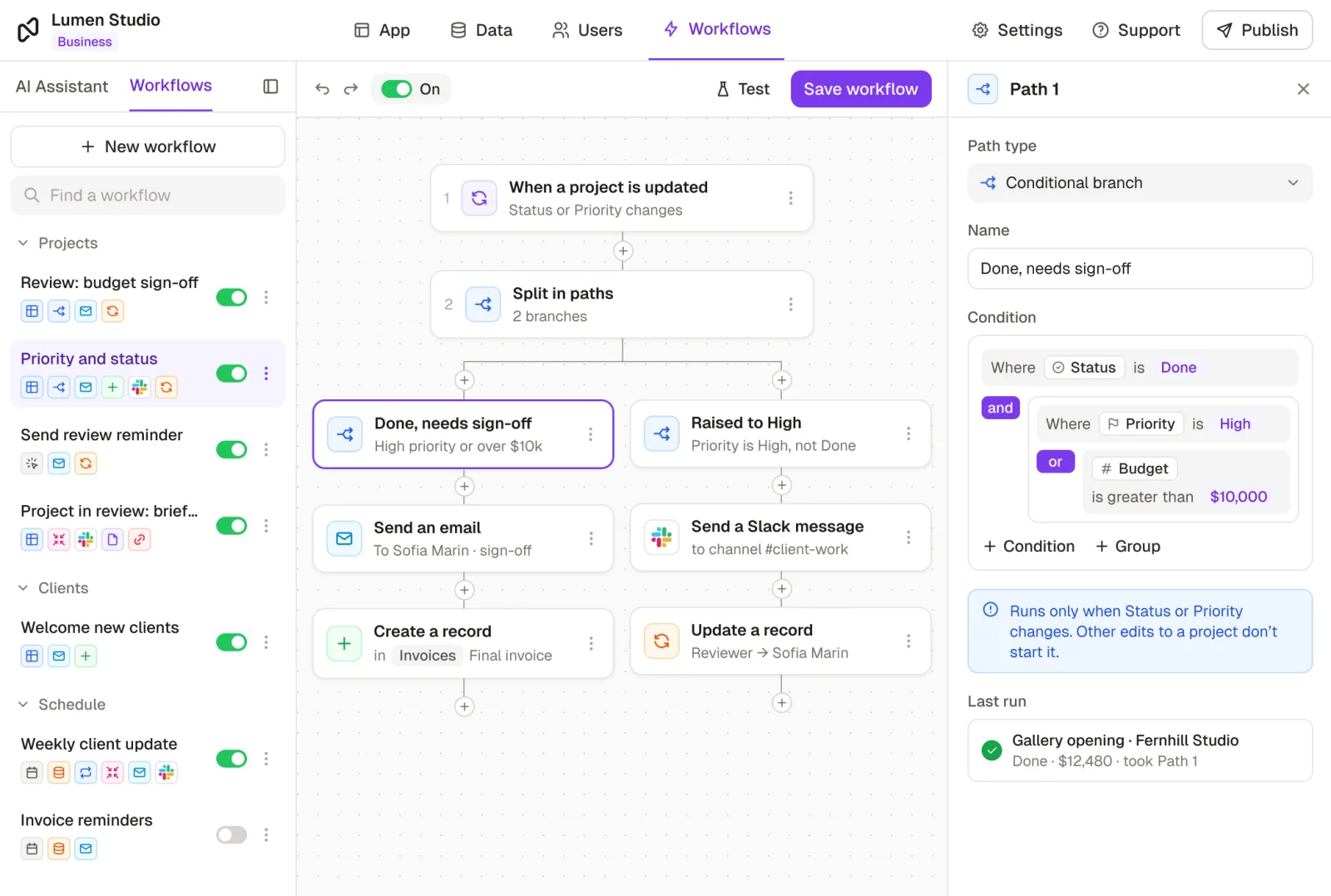
Speed up requests and approvals
Stop running requests through spreadsheets and email. People submit a form, the right person gets notified to approve it, and everyone can see where it stands.
- Request trackers for equipment, IT, purchases and time off
- Approval flows that route budgets, contracts and invoices to the right person
- Onboarding checklists for new hires and new vendors
Manage resources, stock and vendors
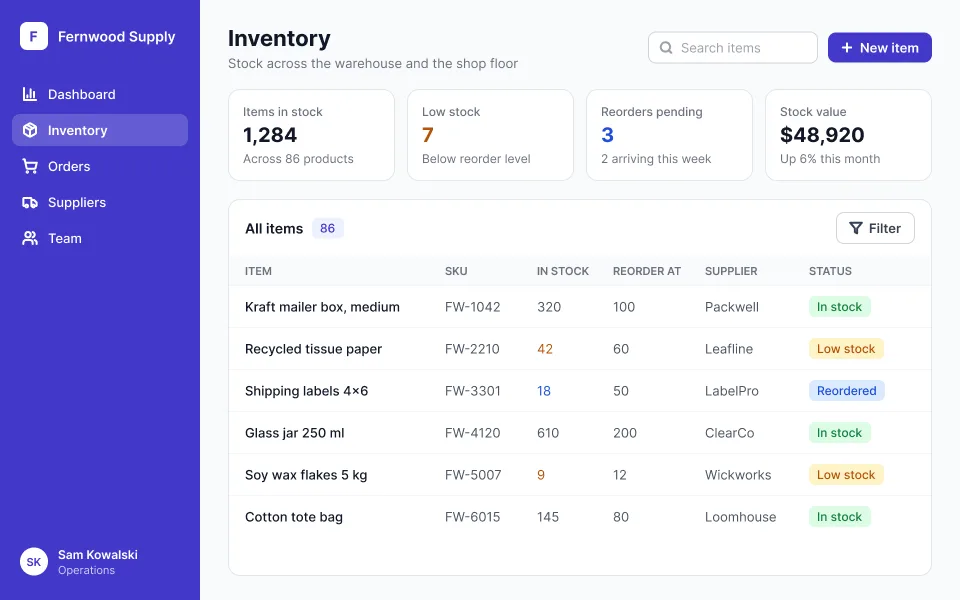
Keep the records your business runs on in one place, connected to each other, instead of a different tool for every team.
- Inventory with stock levels, suppliers and reorder points
- Vendor management with contracts, contacts and renewals
- Portals where vendors and partners update their own records
See how the business is running
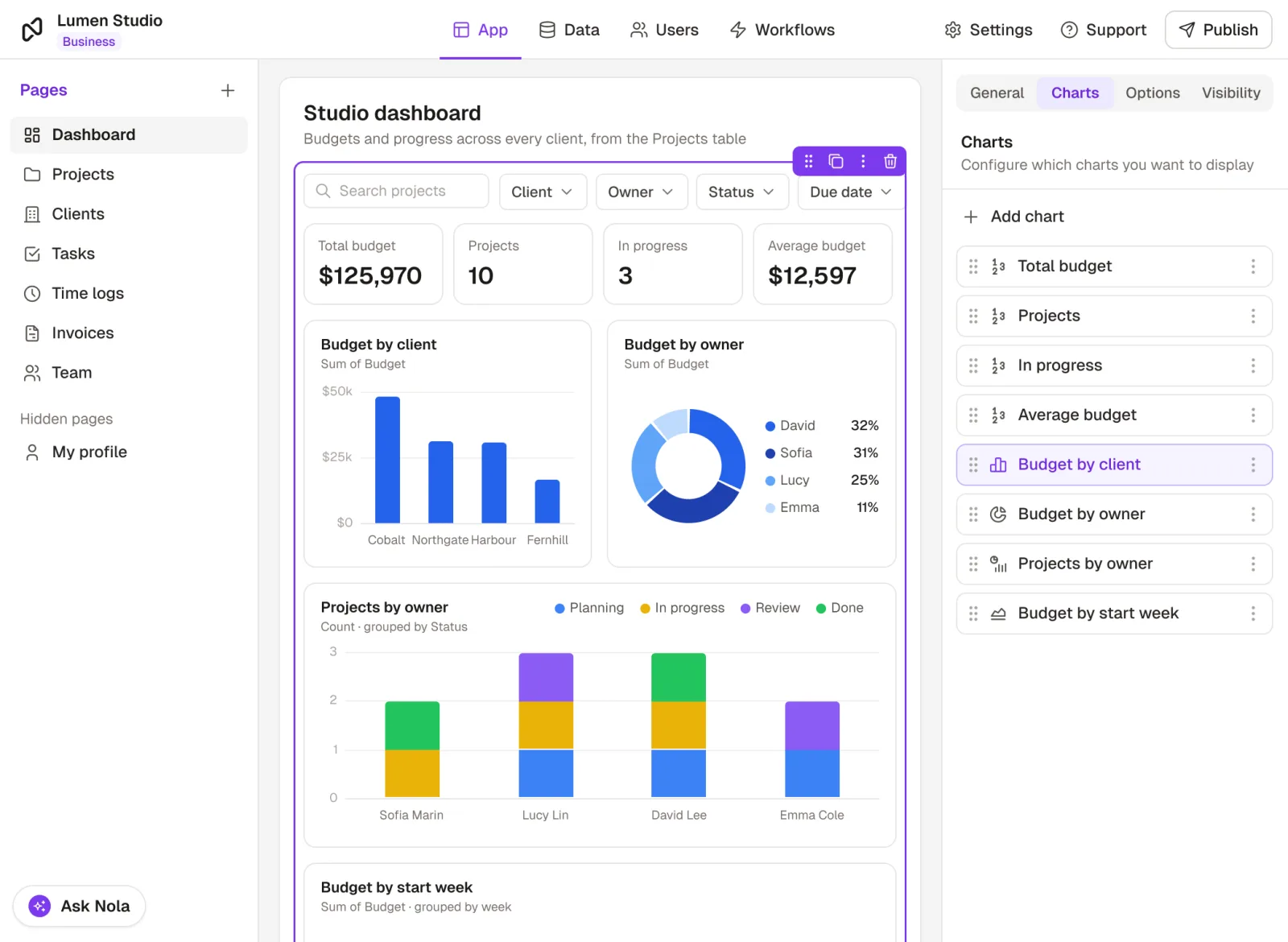
Build dashboards and reports on the same data your team works in, so the numbers are always current and nobody rebuilds a spreadsheet on Monday morning.
- KPI dashboards for each team, on live data
- Project and task trackers with owners and deadlines
- Leadership reports that pull the key numbers into one view
Templates
Start from a template
Pick a ready-made app with sample data, then change it to fit how your team works.
Employee leave tracker
Time-off requests, approvals and balances in one place.
Employee onboarding
Checklists, documents and steps for every new hire.
Inventory tracking
Stock, suppliers and reorders, always up to date.
Vendor management
Vendors, contracts and renewals, with a portal for each vendor.
OKR management
Set goals, track key results and share progress.
Enterprise resource planning
Orders, inventory, finance and teams in one system.
Built with AI. Run on rules you control.
Describe how your operations run and Nola builds the app. Unlike vibe-coded apps, logins, permissions and your data are handled by Noloco, not generated code.
Start from your own data
Import from Excel or Google Sheets, or connect Airtable, Postgres and more.
Change it yourself
Every table, view and workflow can be edited with point and click.
Access is set, not generated
Who sees which records and fields is configured in Noloco, not left to AI-written code.
Works with Claude
Connect Claude to Noloco through our MCP server and build or update your app by prompting.
Platform
Software your whole operation can rely on
Role-based permissions
Control who sees and edits what, at the table, page, record and field level.
Workflows and automations
Send notifications, update records and route approvals automatically, or connect Zapier, Make and n8n.
Works on any device
Your team uses the same app on desktop and mobile, in the office or on the floor.
Portals for vendors and partners
Give people outside your team a branded login that shows only their own records.
Comments and record history
Discuss work on the record itself, and see who changed what, and when.
Certified security
ISO/IEC 27001 certified, hosted in the EU, with two-factor sign-in and SAML single sign-on.
Integrations
Connect the tools you already use
 Airtable
 Google Sheets
 HubSpot
 Postgres
 MySQL
 Supabase
 SmartSuite
 Xano
 Stripe
 Zapier
 Make
 n8n
 Slack
 Google Drive
Customer love
Operations teams that run on Noloco



“With Noloco, we could shape the system around how our business actually runs. It felt like going from a messy spreadsheet to a proper software tool.”
 Candra JohnsonOperations Manager, OH-Visas
“We've saved at least one person, if not two, in terms of headcount.”
 Dan StonesHead of Coaching & Operations, Pravar Group
“Clean UI, great customization, and the best support team I have ever experienced with any software. We needed an internal & client tool and evaluated other tools, we loved the flexibility and UI design of Noloco the best. Bright future for this team and product!”
Frequently asked questions
What is an operations management app?
An operations management app brings the day-to-day running of a business into one place: requests, approvals, inventory, vendors, projects and the reports that show how it's all going.
Instead of tracking each process in a different spreadsheet, inbox or tool, your team works from one app built around how your business actually runs. With Noloco, you build that app yourself, on your own data.
What can operations teams build with Noloco?
Request trackers, approval workflows, employee and vendor onboarding, inventory management, vendor management, purchase orders, project trackers, KPI dashboards and portals for vendors and partners, among others.
You can start from a template or describe what you need and let Nola, the Noloco AI assistant, build it.
Can I build approval workflows in Noloco?
Yes. When a request is submitted, a workflow can notify the right approver, and action buttons let them approve or reject it in one click. The request's status updates and the person who asked is told automatically.
You can add conditions too, for example sending anything over a set budget to finance for a second sign-off.
Can I use my existing spreadsheets or Airtable data?
Yes. Import from Excel or Google Sheets, or connect Airtable, HubSpot, Postgres, MySQL and other sources directly.
There's no migration project: build your operations app on the data you keep today, then add the tables, views and workflows your team needs as you go.
How is Noloco different from buying separate tools for each process?
Off-the-shelf tools each cover one process, in their own way, with their own data. Over time your operations end up spread across many of them, and someone copies information between them by hand.
With Noloco, you build the tools your team needs in one app, on one set of data, shaped around your own processes. When a process changes, you change the app yourself.
Can people outside my team use the app?
Yes. You can invite vendors, partners, contractors or clients to log in to the same app, and permissions make sure each of them only sees and edits their own records.
Do I need technical skills to build an operations app?
No. Noloco is built for non-technical teams. Describe what you need and Nola builds it, or start from a template, then change anything with point and click.
If you'd rather have it built for you, you can hire a certified Noloco expert.
Is Noloco secure enough for our operations data?
Yes. Noloco is ISO/IEC 27001 certified, hosted on Amazon Web Services in the EU, and encrypts your data in transit and at rest. You can add two-factor authentication, and SAML single sign-on is available on the Enterprise plan.
Inside each app, permissions control access at the table, page, record and field level. Read more on our security page.
Get your operations out of spreadsheets this month
Build your first operations app this week. Free to start, no credit card required.
No credit card required